 Unlock
Page: 1
/
14
Total 69 questions
Ace Adobe Commerce Developer with Cloud Add-on AD0-E716: Your Blueprint to Success
Question 1
An Adobe Commerce developer has added an iframe and included a JavaScript library from an external domain to the website. After that, they found the following error in the console:
Refused to frame [URL] because it violates the Content Security Policy directive.
In order to fix this error, what would be the correct policy ids to add to the csp_whitelist.xml file?
Correct : C
The frame-ancestors directive specifies the domains that are allowed to embed the current page in an iframe. The connect-src directive specifies the domains that are allowed to be loaded by the current page through a <script> tag or XMLHttpRequest.
In this case, the developer has added an iframe that embeds a page from an external domain. The Content Security Policy (CSP) is preventing the iframe from being loaded because the domain of the external page is not listed in the frame-ancestors directive.
To fix this error, the developer needs to add the domain of the external page to the frame-ancestors directive. They can do this by adding the following line to the csp_whitelist.xml file:
<frame-ancestors>https://www.example.com</frame-ancestors>
Start a Discussions
Submit Your Answer:
Question 2
An Adobe Commerce developer creates a new website using a data patch. Each website will have unique pricing by website. The developer does not have visibility into the production and staging environments so they do not know what the configuration currently is.
How would they ensure the configuration is deployed and consistent across all environments?
A)



Correct : B
To ensure that the configuration is deployed and consistent across all environments, the developer can use the following steps:
Create a data patch that contains the configuration for the new website.
Deploy the data patch to all environments.
Use themagento deploy:statuscommand to verify that the configuration has been deployed to all environments.
Start a Discussions
Submit Your Answer:
Question 3
An Adobe Commerce developer is working on a custom gallery extension.
The module uses the Magento\catalog\Model\iinageUploader class for image uploading. The admin controller for custom image uploads is Vendor\CustomGallery\Controller\Adminhtml\Image\Upload.
The images need to be stored in different basePath and baseTmpPath than the default ones.
How can the default imageuploader class be extended and used without affecting the other modules that are already using it?
A)
B)
C)
Correct : B
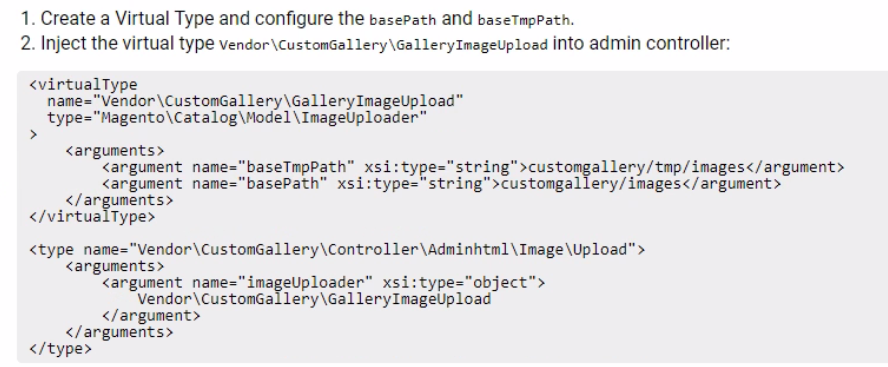
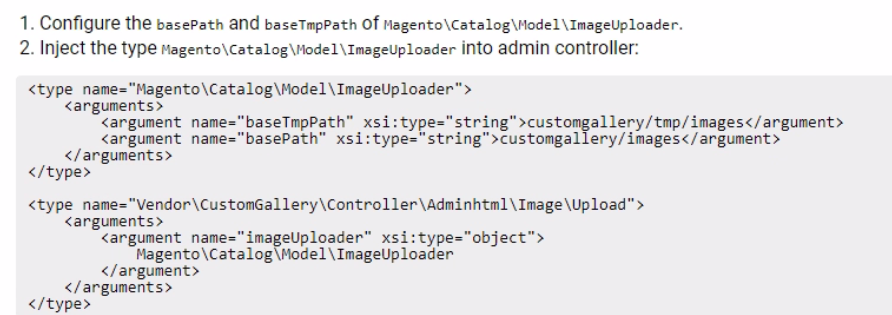
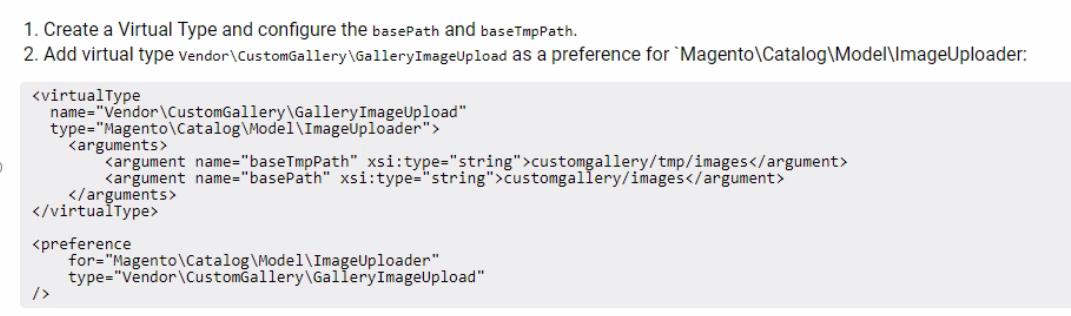
According to the ImageUploader component guide for Magento 2 developers, the ImageUploader UI component gives users the ability to upload images to the Magento Media Gallery. This component is a variation of the FileUploader component and uses the same configuration settings. The ImageUploader component uses the Magento\catalog\Model\iinageUploader class for image uploading, which has properties such as basePath and baseTmpPath that define where the images are stored. To extend the default imageuploader class and use it without affecting the other modules that are already using it, the developer needs to create a virtual type of this class in their module's di.xml file and specify different values for basePath and baseTmpPath. The developer also needs to inject their virtual type into their admin controller using the imageUploader argument. Therefore, option B is the correct answer, as it shows the correct di.xml and controller code to extend and use the imageuploader class. Verified Reference: https://devdocs.magento.com/guides/v2.3/ui_comp_guide/components/image-uploader/
Start a Discussions
Submit Your Answer:
Question 4
An Adobe Commerce developer has created a module that adds a product attribute to all product types via a Data Patch-According to best practices, how would the developer ensure this product attribute is removed in the event that the module is uninstalled at a later date?
Start a Discussions
Submit Your Answer:
Question 5
An Adobe Commerce developer is being tasked with creating a new cron job to run a method that has already been written. What are the minimally required steps to accomplish this?
Correct : C
According to the Configure and run cron guide for Magento 2 developers, the crontab.xmi file is used to declare and configure cron jobs for a module. The file should specify the name, instance, method and schedule of the cron job. Therefore, creating a crontab.xmi file and setting a schedule for the new cron job are the minimally required steps to accomplish this task. Verified Reference: https://devdocs.magento.com/guides/v2.3/config-guide/cli/config-cli-subcommands-cron.html
Start a Discussions
Submit Your Answer:
Want to Unlock Everything for
Adobe AD0-E716 Exam?
Adobe AD0-E716 Exam?
By upgrading to Premium Access, you’ll instantly unlock:
Unlock 69 Premium Questions
- Exam Name: Adobe Commerce Developer with Cloud Add-on
- Exam Code: AD0-E716
- Last Update: 12-Aug-2026
- Formats: PDF, Web-based,
Desktop Practice - 24/7 Customer Support
 Price: $59 (PDF Format)