 Unlock
Page: 1
/
14
Total 70 questions
Master Adobe Workfront Core Developer Professional with Cutting-Edge AD0-E908 Prep
Question 1
A task includes an approval requiring a lead designers approval decision before it can be completed. What action will trigger the approval by the lead designer?
Correct : A
Objective: Trigger the approval by the lead designer for a task to be completed.
Approval Trigger:
Action: Request a document approval from the lead designer.
Start a Discussions
Submit Your Answer:
Question 2
What are the constraints among Programs, Portfolios. Tasks, and Projects?
Correct : B
In Adobe Workfront, there are specific constraints regarding the association of projects, programs, portfolios, and tasks. A project and its tasks can only belong to one portfolio and one program at a time. This means that a single project cannot be simultaneously associated with multiple portfolios or programs. This constraint ensures clear and unambiguous project management and reporting within the organizational structure.
Start a Discussions
Submit Your Answer:
Question 3
An organization wants to ensure that everyone can fill out the general project custom form associated with the general project template. What is the correct sharing setting for the custom form?
Correct : B
Objective: Ensure that everyone in the organization can fill out the general project custom form associated with the general project template.
Form Sharing Settings:
Correct Setting: Update the form sharing to 'Make this visible system-wide so that everyone in Workfront can see it'.
Start a Discussions
Submit Your Answer:
Question 4
What is the hierarchical relationship between a Queue Topic and Topic Group?
Correct : A
In Adobe Workfront, the hierarchical relationship between Queue Topics and Topic Groups is that Topic Group is the parent, and Queue Topic is the child. This means that a Topic Group can contain multiple Queue Topics, but a Queue Topic is always part of a Topic Group. This structure helps organize and categorize different types of requests or issues within Workfront, making it easier to manage and track them.
Reference
The hierarchy between Queue Topics and Topic Groups is frequently highlighted in Workfront documentation and training materials, reinforcing that Topic Groups serve as the broader category under which specific Queue Topics fall.
Start a Discussions
Submit Your Answer:
Question 5
Refer to the exhibit.
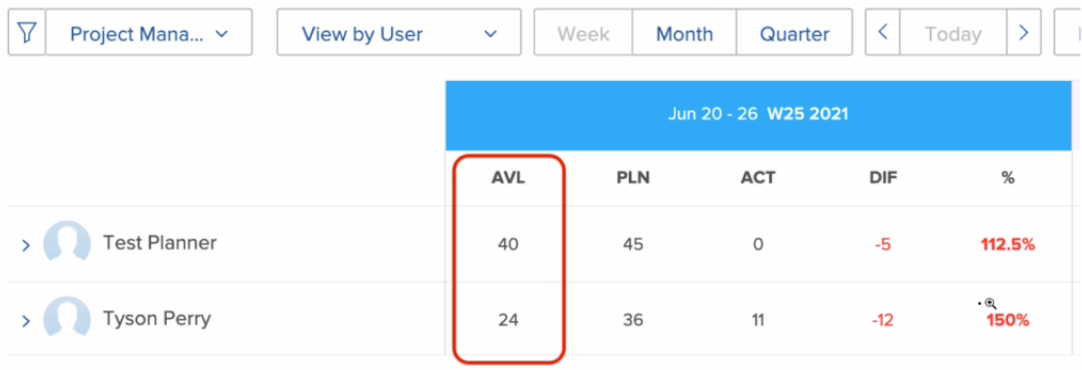
Which two settings can affect a user's total number of hours shown in the available hours (AVL) column? (Choose two.)
Correct : B, C
The total number of available hours (AVL) for a user in Workfront can be affected by the following settings:
Time Off: If days are entered in the Time Off menu within a user's settings, these days will be excluded from the total available hours, reducing the AVL value.
FTE (Full Time Equivalent): If a user's FTE setting is less than 1, this indicates that the user is working part-time. This setting will proportionally reduce the number of available hours shown in the AVL column.
Reference
These settings are documented in Workfront's user management and scheduling documentation, where the impact of time off and FTE adjustments on user availability is detailed.
Start a Discussions
Submit Your Answer:
Want to Unlock Everything for
Adobe AD0-E908 Exam?
Adobe AD0-E908 Exam?
By upgrading to Premium Access, you’ll instantly unlock:
Unlock 70 Premium Questions
- Exam Name: Adobe Workfront Core Developer Professional
- Exam Code: AD0-E908
- Last Update: 11-Aug-2026
- Formats: PDF, Web-based,
Desktop Practice - 24/7 Customer Support
 Price: $59 (PDF Format)