 Unlock
Page: 1
/
14
Total 68 questions
Master Fortinet NSE 6 FortiClient EMS 7.4 (FCP_FCT_AD-7.4) Fast
Question 1
An administrator deploys a FortiClient installation through the Microsoft AD group policy After installation is complete all the custom configuration is missing.
What could have caused this problem?
Correct : D
When deploying FortiClient via Microsoft AD Group Policy, it is essential to ensure that the deployment package is correctly assigned to the target group. The absence of custom configuration after installation can be due to several reasons, but the most likely cause is:
Deployment Package Assignment: The FortiClient package must be assigned to the appropriate group in Group Policy Management. If this step is missed, the installation may proceed, but the custom configurations will not be applied.
Thus, the administrator must ensure that the FortiClient package is correctly assigned to the group to include all custom configurations.
Reference
FortiClient EMS 7.2 Study Guide, Deployment and Installation Section
Fortinet Documentation on FortiClient Deployment using Microsoft AD Group Policy
Start a Discussions
Submit Your Answer:
Question 2
Refer to the exhibit, which shows the Zero Trust Tagging Rule Set configuration.
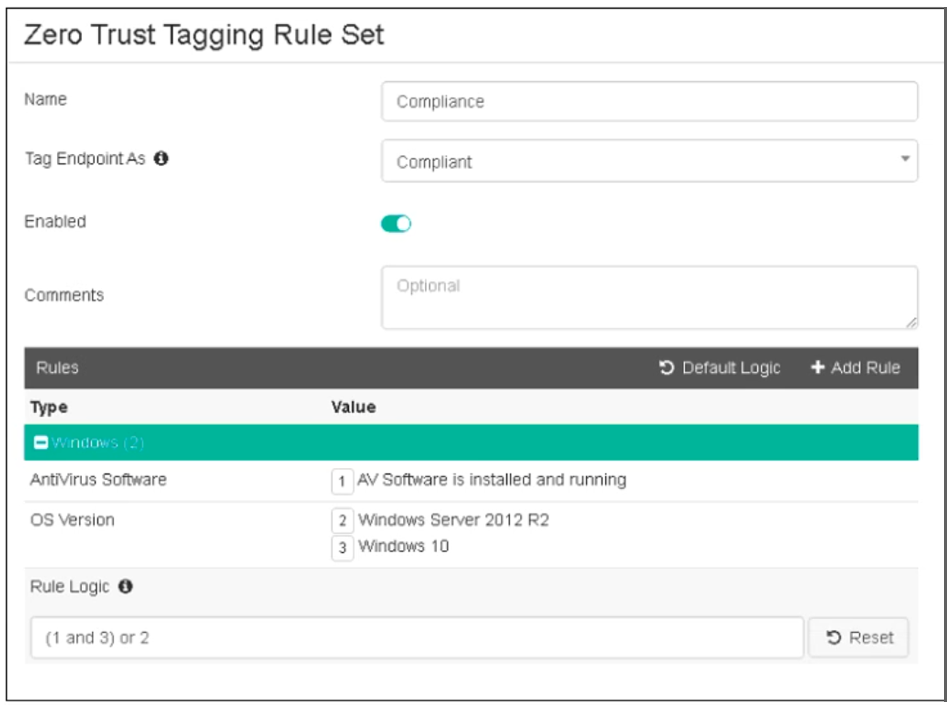
Which two statements about the rule set are true? (Choose two.)
Correct : C, D
Based on the Zero Trust Tagging Rule Set configuration shown in the exhibit:
The rule set includes two conditions:
AV Software is installed and running
OS Version is Windows Server 2012 R2 or Windows 10
The Rule Logic is specified as '(1 and 3) or 2,' meaning:
The endpoint must have antivirus software installed and running and must be running Windows 10.
Alternatively, the endpoint must be running Windows Server 2012 R2.
Therefore, the endpoint must satisfy either:
Antivirus is installed and running and Windows 10 is running.
Windows Server 2012 R2 is running.
Reference
FortiClient EMS 7.2 Study Guide, Zero Trust Tagging Rule Set Configuration Section
Fortinet Documentation on Configuring Zero Trust Tagging Rules and Logic
Start a Discussions
Submit Your Answer:
Question 3
Which component or device shares device status information through ZTNA telemetry?
Correct : A
FortiClient communicates directly with FortiClient EMS to continuously share device status information through ZTNA telemetry.
Start a Discussions
Submit Your Answer:
Question 4
Refer to the exhibit, which shows FortiClient EMS deployment, profiles.

When an administrator creates a deployment profile on FortiClient EMS. which statement about the deployment profile is true?
Correct : A
Deployment Profiles Analysis:
Deployment-1 has the 'First-Time-Installation' package and is assigned to 'All Groups' with a priority of 1 but is not enabled.
Deployment-2 has the 'To-Upgrade' package, is assigned to both 'All Groups' and 'trainingAD.training.lab,' with a priority of 2 and is enabled.
Evaluating Deployment-2:
Deployment-2 will upgrade FortiClient on both 'All Groups' and 'trainingAD.training.lab' since it is enabled and assigned to these groups. This includes both AD (Active Directory) groups and workgroups.
Conclusion:
Since Deployment-2 is set to upgrade FortiClient on all the assigned groups and workgroups, the correct answer is A.
FortiClient EMS deployment and profile documentation from the study guides.
Start a Discussions
Submit Your Answer:
Question 5
An administrator wants to simplify remote access without asking users to provide user credentials Which access control method provides this solution?
Correct : A
Simplifying Remote Access:
The administrator wants to simplify remote access without asking users to provide user credentials.
Evaluating Access Control Methods:
ZTNA full mode can provide seamless access by leveraging device identity and posture, eliminating the need for user credentials for each access request.
Other methods like SSL VPN and L2TP typically require user credentials.
Conclusion:
The correct access control method that provides this solution is ZTNA full mode.
ZTNA section in the FortiGate Infrastructure 7.2 Study Guide.
Start a Discussions
Submit Your Answer:
Want to Unlock Everything for
Fortinet FCP_FCT_AD-7.4 Exam?
Fortinet FCP_FCT_AD-7.4 Exam?
By upgrading to Premium Access, you’ll instantly unlock:
Unlock 68 Premium Questions
- Exam Name: Fortinet NSE 6 - FortiClient EMS 7.4 Administrator
- Exam Code: FCP_FCT_AD-7.4
- Last Update: 23-Mar-2026
- Formats: PDF, Web-based,
Desktop Practice - 24/7 Customer Support
 Price: $59 (PDF Format)