 Unlock
Page: 1
/
18
Total 87 questions
Master Fortinet NSE4_FGT_AD-7.6: NSE 4 - FortiOS 7.6 Administrator Exam Success
Question 1
When configuring firewall policies which of the following is true regarding the policy ID? (Choose two.)
Correct : A, B
According to the FortiOS 7.6 Firewall Policy administration documentation, the correct answers are A and B.
Analysis of Each Statement
A . A firewall policy ID identifies the order of policy execution in firewall policies.
Correct
In FortiOS, each firewall policy is assigned a policy ID, which is used internally to reference the policy.
Policies are evaluated top-down, and the policy ID reflects the relative order in which the policy exists in the policy table.
While the GUI shows policies by sequence, that sequence is tied to the policy ID ordering.
Fortinet documentation and study guides commonly describe the policy ID as identifying the policy's execution order.
Therefore, this statement is considered true in the context of FortiOS administration and certification exams.
B . A policy ID cannot be modified once a policy is created.
Correct
Once a firewall policy is created, its policy ID is fixed.
You can:
Move the policy up or down in the policy list
Edit the policy contents
But you cannot change the policy ID itself.
This is explicitly documented behavior in FortiOS.
C . You can create a policy in CLI with policy ID 0
Incorrect
Policy ID 0 is reserved by FortiOS.
In the CLI, using:
edit 0
does not create a policy with ID 0; instead, it tells FortiGate to automatically assign the next available policy ID.
A real firewall policy with ID 0 cannot exist.
D . It is mandatory to provide a policy ID while creating a firewall policy regardless of GUI or CLI.
Incorrect
In the GUI, policy IDs are assigned automatically.
In the CLI, administrators can use edit 0 to auto-generate a policy ID.
Therefore, manually specifying a policy ID is not mandatory.
Start a Discussions
Submit Your Answer:
Question 2
Refer to the exhibit.
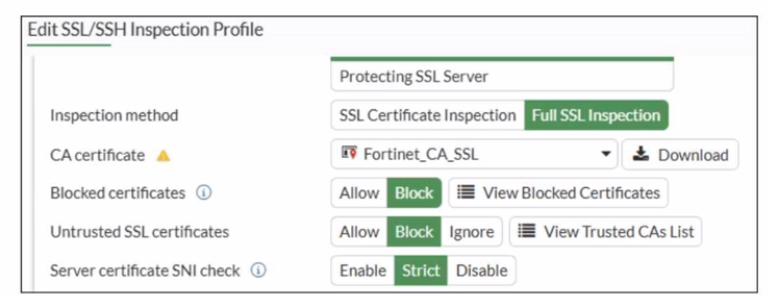
What would be the impact of these settings on the Server certificate SNI check configuration on FortiGate?
Correct : C
Based on the exhibit and the FortiOS 7.6 SSL/SSH Inspection documentation, the correct answer is C.
Understanding the Exhibit Configuration
In the SSL/SSH Inspection Profile, the following settings are shown:
Inspection method: Full SSL Inspection
Server certificate SNI check: Strict
This setting directly controls how FortiGate validates the Server Name Indication (SNI) provided by the client during the TLS handshake.
FortiOS 7.6 Behavior of ''Server certificate SNI check''
FortiOS supports three modes for Server certificate SNI check:
Disable
No validation between SNI and server certificate.
Enable
FortiGate checks SNI against the certificate.
If mismatch occurs, FortiGate may still allow the session with reduced validation.
Strict
FortiGate enforces a strict match.
The SNI must match either the CN (Common Name) or one of the SAN (Subject Alternative Name) entries in the server certificate.
If the SNI does not match either CN or SAN, the TLS session is immediately terminated.
The exhibit clearly shows Strict selected.
Why Option C is Correct
With Strict enabled, FortiGate rejects the TLS connection when:
The SNI does not match the CN, and
The SNI does not match any SAN entry
This results in the connection being closed, not allowed with warnings or fallback behavior.
Therefore:
C . FortiGate will close the connection if the SNI does not match the CN or SAN fields is exactly the documented behavior.
Why the Other Options Are Incorrect
A: FortiGate does not fall back to using the CN for URL filtering when Strict is enabled.
B: There is no ''accept with warning'' behavior in Strict mode.
D: Incorrect logical condition. FortiGate does not require mismatch with both CN and SAN simultaneously; a mismatch with either valid field set is sufficient to close the connection.
Start a Discussions
Submit Your Answer:
Question 3
Refer to the exhibit.
A partial cloud topology is shown.
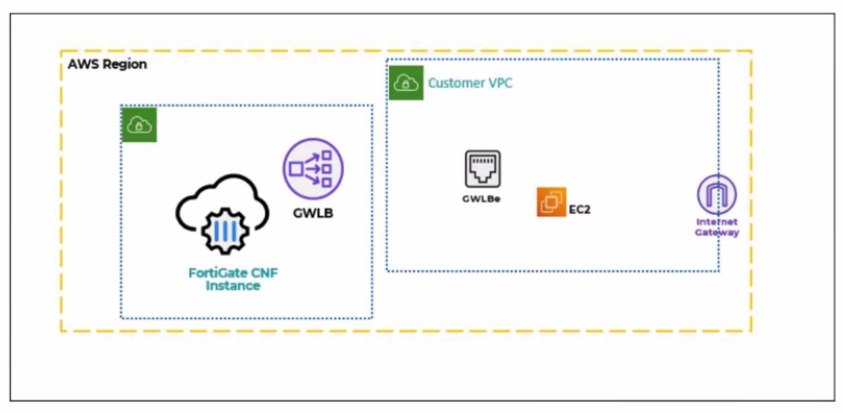
You deployed a FortiGate Cloud-Native Firewall (CNF) in AWS.
During the deployment, which components must the FortiGate CNF create to handle traffic from the EC2 instance?
Correct : B
In the FortiGate Cloud-Native Firewall (CNF) for AWS architecture, traffic from workloads (such as an EC2 instance) in the customer VPC is redirected to the security service (FortiGate CNF) using AWS Gateway Load Balancer (GWLB) technology.
The key AWS component that must exist inside the customer VPC to steer workload traffic to the GWLB is the:
Gateway Load Balancer Endpoint (GWLBe)
This endpoint is what the customer VPC routes point to (for example, default route or subnet route entries), enabling transparent insertion of the FortiGate CNF inspection path for EC2 traffic.
Why the other options are not correct:
A: CNF does not ''create the customer VPC'' (that is customer-owned), and ''GWLBe'' is the only relevant created item here, not the whole VPC.
C: Customer VPC is not created by CNF, and GWLB is typically part of the CNF service side; the question specifically asks what must be created to handle traffic from the EC2 instance (that requires GWLBe in the customer VPC).
D: CNF does not create the Internet Gateway (IGW) in the customer VPC, and IGW is not the required CNF-created component for steering traffic to FortiGate CNF.
Start a Discussions
Submit Your Answer:
Question 4
Which three statements about SD-WAN performance SLAs are true? (Choose three.)
Correct : C, D, E
In FortiOS 7.6, SD-WAN Performance SLAs are used to measure link quality and influence SD-WAN rule decisions. The following three statements are true.
C . All the SLA targets can be configured.
True
SD-WAN Performance SLAs allow administrators to configure:
Latency
Jitter
Packet loss
Mean Opinion Score (MOS) (for voice)
Threshold values for these metrics are fully configurable per SLA.
This is explicitly documented in the SD-WAN Performance SLA configuration section.
D . They are applied in an SD-WAN rule lowest cost strategy.
True
Performance SLAs are commonly used with the Lowest Cost (SLA-based) strategy.
In this strategy:
FortiGate selects the lowest-cost link that meets the SLA requirements.
If a link violates the SLA, it is excluded from selection.
E . They can be measured actively or passively.
True
FortiOS supports:
Active probing (synthetic probes such as ping/HTTP)
Passive measurement (based on real traffic statistics)
Administrators can choose how SLAs are measured depending on the deployment and requirements.
Why the other options are incorrect
A . They rely on session loss and jitter.
Incorrect
SLAs measure packet loss, latency, and jitter.
Session loss is not an SLA metric in FortiOS.
B . They monitor the state of the FortiGate device.
Incorrect
Performance SLAs monitor link quality, not FortiGate system health or device state.
Start a Discussions
Submit Your Answer:
Question 5
Refer to the exhibits.
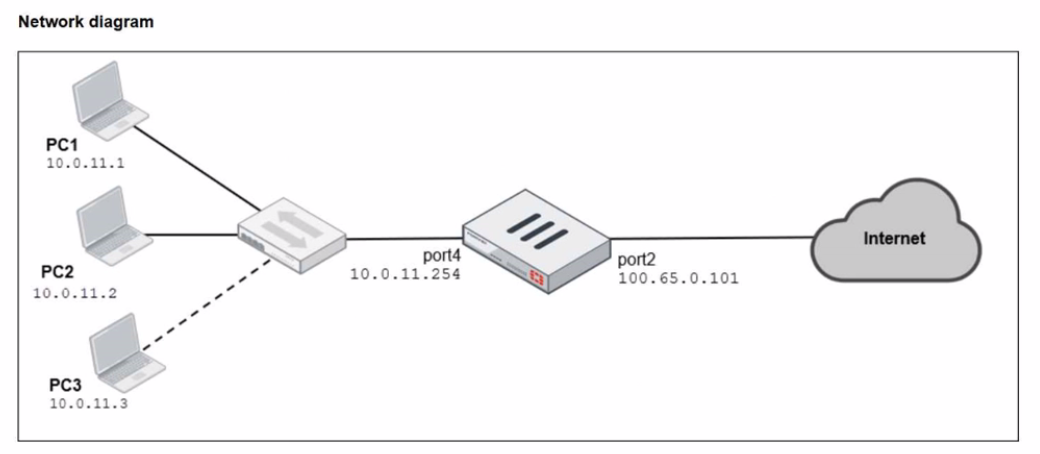
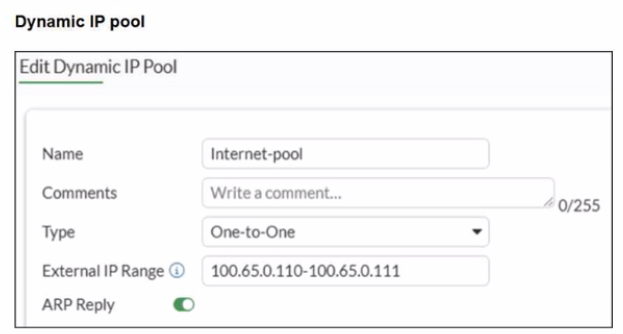
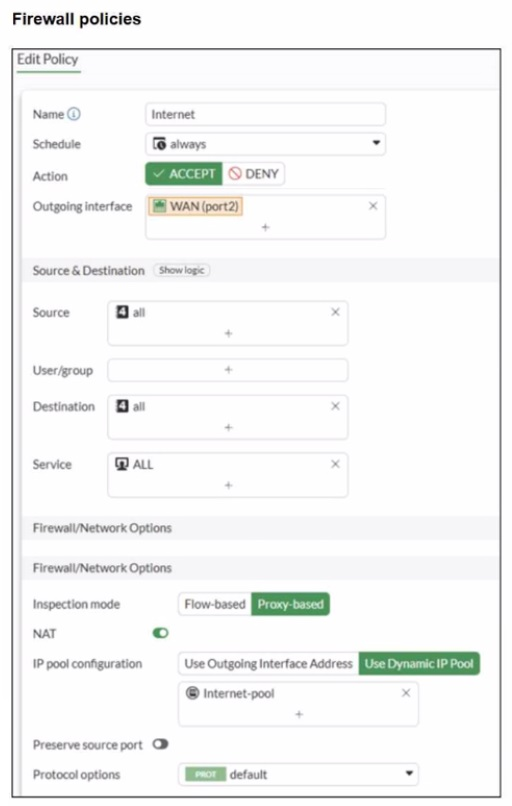
A diagram of a FortiGate device connected to the network, as well as the firewall policy and IP pool configuration on the FortiGate device are shown.
Two PCs. PC1 and PC2, are connected behind FortiGate and can access the internet successfully. However, when the administrator adds a third PC to the network (PC3), the PC cannot connect to the internet.
Based on the information shown in the exhibit, which two configuration options can the administrator use to fix the connectivity issue for PC3? (Choose two.)
Correct : B, D
From the exhibits:
The firewall policy has NAT enabled and is configured to Use Dynamic IP Pool.
The selected IP pool (Internet-pool) is configured as:
Type: One-to-One
External IP Range: 100.65.0.110--100.65.0.111 (only two public IPs)
PC1 and PC2 can access the internet because each one-to-one NAT mapping consumes one public IP from the pool. When PC3 is added, there is no third public IP available in the pool, so FortiGate cannot allocate a one-to-one mapping for PC3 and the session fails.
FortiOS behavior here is standard: with one-to-one IP pools, the available pool size limits how many distinct internal sources can be translated concurrently (depending on allocation and sessions), and a pool with only two IPs will not reliably support three separate hosts needing translations.
Therefore, the administrator can fix this in two valid ways:
B . In the IP pool configuration, set end ip to 100.65.0.112.
This expands the pool by adding an additional public IP address, making three public IPs available (.110, .111, .112), so PC3 can be assigned an address for one-to-one NAT.
D . In the IP pool configuration, set type to overload.
Changing the pool type to overload enables PAT (many-to-one), allowing multiple internal hosts (PC1, PC2, PC3) to share the pool address(es) using different source ports. This removes the ''one public IP per internal host'' limitation inherent to one-to-one pools.
Why the other options are not correct:
A . Multiple Interface Policies is unrelated to IP pool exhaustion and does not solve NAT allocation limits. C . match-vip affects VIP matching behavior for destination NAT/virtual IP usage and does not address the source NAT pool shortage causing PC3 to fail.
Start a Discussions
Submit Your Answer:
Want to Unlock Everything for
Fortinet NSE4_FGT_AD-7.6 Exam?
Fortinet NSE4_FGT_AD-7.6 Exam?
By upgrading to Premium Access, you’ll instantly unlock:
Unlock 87 Premium Questions
- Exam Name: Fortinet NSE 4 - FortiOS 7.6 Administrator
- Exam Code: NSE4_FGT_AD-7.6
- Last Update: 14-May-2026
- Formats: PDF, Web-based,
Desktop Practice - 24/7 Customer Support
 Price: $59 (PDF Format)