 Unlock
Page: 1
/
23
Total 111 questions
Master Fortinet NSE5_FSW_AD-7.6: NSE 5 - FortiSwitch 7.6 Administrator Exam Success
Question 1
Which statement about the use of the switch port analyzer (SPAN) packet capture method is true?
Correct : A
The correct statement about using the Switch Port Analyzer (SPAN) packet capture method on FortiSwitch is that 'Mirrored traffic can be sent across multiple switches (A).' This feature allows for extensive traffic analysis as it enables network administrators to configure SPAN sessions that span across different switches, thereby providing the capability to monitor traffic across a broad segment of the network infrastructure.
Start a Discussions
Submit Your Answer:
Question 2
You are designing a multi-tenant network using FortiSwitch devices in standalone mode. Security is a priority and each tenant's servers must be completely isolated from one another, and from all other servers in the network, to prevent lateral communication. However, all servers must have access to the shared FortiGate firewall for internet access. Which type of private VLAN (PVLAN) configuration should you apply to meet these security requirements? (Choose one answer)
Correct : C
According to theFortiSwitchOS 7.6 Administration Guideand theFortiSwitch 7.6 Study Guide, Private VLANs (PVLANs) provide a mechanism to partition a regular VLAN (the Primary VLAN) into sub-VLANs to control Layer 2 traffic flow within the same broadcast domain.
In a multi-tenant environment requiring strict security, anIsolated VLAN (Option C)is the correct choice to prevent lateral communication between servers. The documentation specifies that ports within an Isolated VLAN are completely blocked from communicating with any other ports in the same Isolated VLAN or any Community VLANs. This effectively eliminates the risk of 'east-west' traffic or lateral movement between tenant servers, even if they reside in the same physical switch and logical subnet.
However, the architecture of PVLANs ensures that these isolated ports can still communicate withPromiscuous ports. In this scenario, the shared FortiGate firewall would be connected to a Promiscuous port within thePrimary VLAN (Option D). This allows all tenant servers in the Isolated VLAN to send and receive traffic to the FortiGate for internet access and centralized security filtering, while remaining invisible to one another at the hardware layer.
Community VLANs (Option B)would be inappropriate for this specific requirement because ports within a Community VLANcancommunicate with each other, which violates the requirement for complete isolation between all servers. Therefore, the combination of an Isolated VLAN for the servers and a Promiscuous port for the firewall is the standard design for multi-tenant isolation in FortiSwitchOS 7.6.
Start a Discussions
Submit Your Answer:
Question 3
Refer to the diagnostic output:
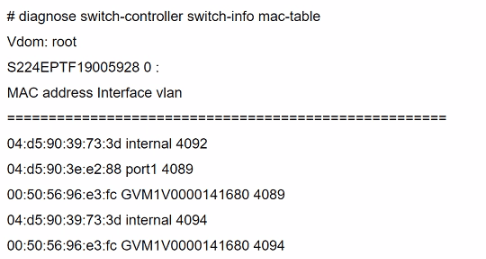
Two entries in the exhibit show that the same MAC address has been used in two different VLANs. Which MAC address is shown in the above output?
Correct : B
The MAC address '00:50:56:96:e3:fc' appearing in two different VLANs (4089 and 4094) in the diagnostic output indicates it is a MAC address associated with a device that supports traffic from multiple VLANs. Such a behavior is typical of network infrastructure devices like switches or routers, which are configured to allow traffic from various VLANs to pass through a single physical or logical interface. This is essential in network designs that utilize VLANs to segregate network traffic for different departments or use cases while using the same physical infrastructure.
For more detailed information on MAC table diagnostics and VLAN configurations in FortiGate devices, refer to the official Fortinet documentation:Fortinet Product Documentation.
Start a Discussions
Submit Your Answer:
Question 4
Which LLDP-MED Type-Length-Values does FortiSwitch collect from endpoints to track network devices and determine their characteristics?
Correct : D
While FortiSwitch can collect all the listed LLDP-MED TLVs (Network Policy, Power Management, Location, and Inventory Management), the primary focus for tracking and identifying network devices is on theInventory ManagementTLV.
This TLV carries critical details such as:
Manufacturer
Model
Hardware/Firmware versions
Serial/Asset numbers
This information provides a granular understanding of the devices on your network.
Start a Discussions
Submit Your Answer:
Question 5
Which two are valid traffic processing actions that a FortiSwitch access control list (ACL) can apply to matching traffic? (Choose two answers)
Correct : A, D
According to theFortiSwitchOS 7.6 Administration Guideand theNSE 5 FortiSwitch Study Guide, Access Control Lists (ACLs) are used to provide granular control over the traffic entering or leaving a switch port. ACLs function by definingclassifiers(to match specific traffic based on criteria like MAC address, IP address, or VLAN ID) and then applying specificactionsto that matched traffic.
The documentation explicitly categorizes ACL actions into three distinct groups:
Traffic Processing:This category includes actions that dictate the physical handling of the frame. Valid actions listed in the official documents under this header includecount(to track packet volume),drop(to block the traffic),redirect(to forward the frame to a specific physical port or interface instead of its original destination), andmirror(to send a copy to a monitoring port).
Quality of Service (QoS):This category focuses on traffic prioritization and bandwidth management. It includes actions such asrate limiting,remarking CoS/DSCP values, andsetting the egress queue(e.g., assigning a packet to a specific queue number from 0 to 7).
VLAN:This allows for modifications such as setting anouter VLAN tagon frames.
The question specifically asks for 'traffic processing actions.' Based on the 7.6 documentation,Redirect frames to another port(Option A) andDrop frames(Option D) are explicitly defined under the 'Traffic Processing' action header. While 'Assign traffic to a high-priority egress queue' (Option B) is a valid action an ACL can perform, it is technically categorized as aQoS action, not a traffic processing action.Encrypt frames(Option C) is not a supported ACL action on FortiSwitch hardware, as encryption is typically handled at higher layers or via dedicated MACsec configurations on specific models.
Start a Discussions
Submit Your Answer:
Want to Unlock Everything for
Fortinet NSE5_FSW_AD-7.6 Exam?
Fortinet NSE5_FSW_AD-7.6 Exam?
By upgrading to Premium Access, you’ll instantly unlock:
Unlock 111 Premium Questions
- Exam Name: Fortinet NSE 5 - FortiSwitch 7.6 Administrator
- Exam Code: NSE5_FSW_AD-7.6
- Last Update: 24-Mar-2026
- Formats: PDF, Web-based,
Desktop Practice - 24/7 Customer Support
 Price: $59 (PDF Format)