 Unlock
Page: 1
/
8
Total 36 questions
Master Fortinet NSE5_FWB_AD-8.0: NSE 5 - FortiWeb 8.0 Administrator Exam Success
Question 1
A FortiWeb administrator sees the following request:
GET /api/v1/data HTTP/1.1 Host: example.com Authorization: ApiKey abc123def456
The API key belongs to a user in group B who is authorized to access only /api/v1/reports.
What should the administrator do to prevent this unauthorized access?
Correct : A
The problem is not that the API key is invalid; the key belongs to a real user. The issue is authorization scope: group B is allowed only to access /api/v1/reports, but the request targets /api/v1/data. The correct FortiWeb control is API gateway rule enforcement using API key verification and API user grouping. FortiWeb can restrict API access by user group, sub-URL, API key verification, and configured violation actions. Blocking the endpoint for every group is too broad, moving the user to another group grants unnecessary privilege, and allowing all API keys to access all endpoints destroys endpoint-level authorization. The correct fix is group-based access control on /api/v1/data.
================
Start a Discussions
Submit Your Answer:
Question 2
Refer to the exhibit.
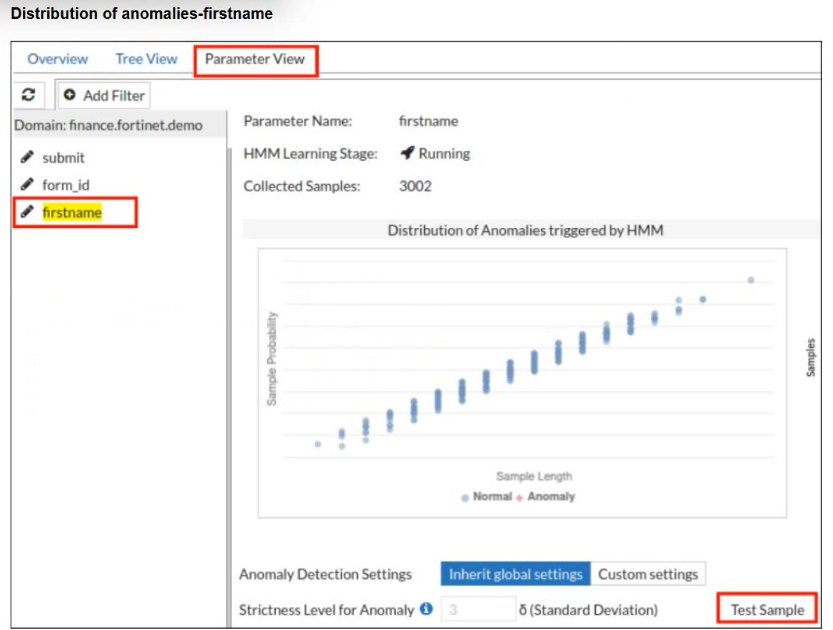
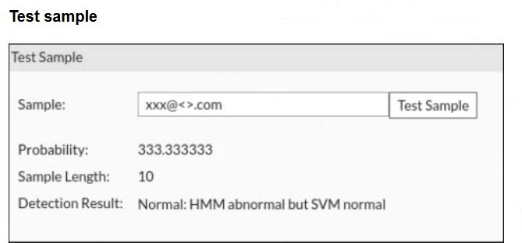
A FortiWeb administrator tests a new form input value after training the machine learning (ML) anomaly detection system.
The hidden Markov model (HMM) flags the input as abnormal, while the support vector machine (SVM) model classifies it as normal. FortiWeb allows the request.
What does this result indicate about the FortiWeb ML anomaly detection behavior?
Correct : C
FortiWeb machine learning uses layered detection rather than treating every unusual value as malicious. The HMM layer models normal parameter behavior and can flag a value as abnormal when it falls outside the learned distribution. However, abnormal does not automatically mean hostile. FortiWeb then uses additional ML classification logic, including SVM-based evaluation, to determine whether the anomaly resembles an actual attack or simply a legitimate unusual input. In this case, HMM noticed that the value was uncommon, but SVM classified it as normal, so FortiWeb allowed the request. That is expected behavior. Raising thresholds, disabling models, or assuming FortiWeb failed would misunderstand the two-stage ML decision process.
================
Start a Discussions
Submit Your Answer:
Question 3
FortiWeb is blocking groups of users behind your load balancer. In the logs, all users show the same source IP address.
Which action should you take to restore proper client identification?
Correct : C
When FortiWeb is deployed behind a load balancer or upstream proxy, it may see only the load balancer IP address as the source for every request. This causes poor client identification and can lead FortiWeb to block many legitimate users as if they are one abusive client. The correct fix is to preserve the original client IP address in an HTTP header, commonly using X-Forwarded-For or a similar trusted client-IP header. FortiWeb can then be configured to read that header for accurate client identification, logging, rate limiting, and IP-based security decisions. Bot detection, signature updates, and HTTPS caching do not solve the core source-IP visibility problem.
================
Start a Discussions
Submit Your Answer:
Question 4
You have configured parameter validation, file security, and machine learning (ML) anomaly detection for a web form, but some server-side request forgery tests are still succeeding. You need to advise the team on what to prioritize next to improve SSRF protection without compromising other parts of the application.
Which recommendation would best strengthen FortiWeb's ability to block remaining SSRF attempts?
Correct : B
SSRF is an application-layer abuse case where attacker-controlled input causes the backend application to make unintended server-side requests. FortiWeb controls such as parameter validation, file security, and ML anomaly detection reduce risk, but SSRF often succeeds when the application accepts weakly validated URLs, hostnames, redirects, metadata endpoints, internal IP ranges, or backend-only resources. Disabling ML would weaken protection. Moving SSRF protection to FortiGate is wrong because SSRF depends on HTTP/API logic, not only network-layer filtering. HTTPS inspection alone does not solve unsafe backend request behavior. The correct priority is to refine input validation and filtering logic so FortiWeb can better detect and block malicious URL, parameter, and backend-request patterns.
================
Start a Discussions
Submit Your Answer:
Question 5
Refer to the exhibit.
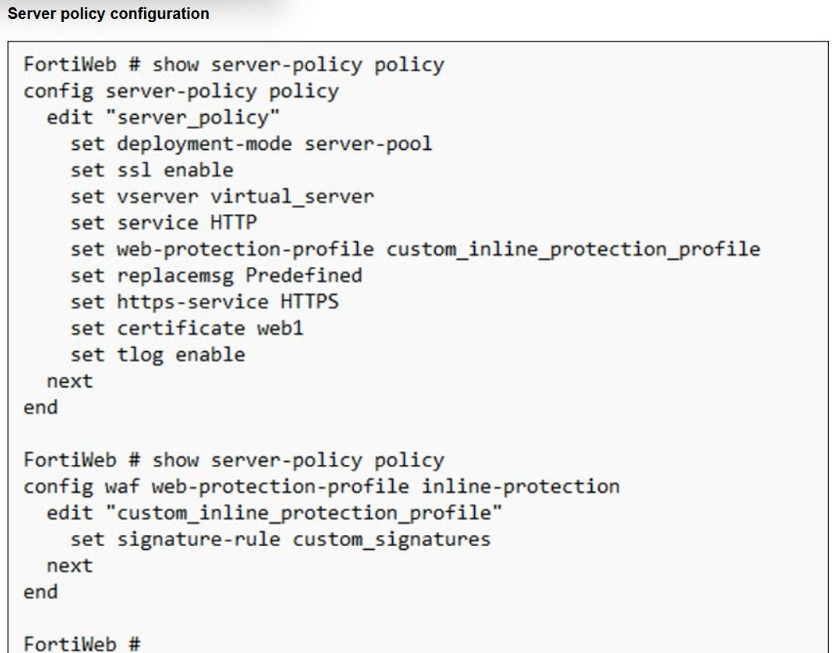
You have deployed FortiWeb behind a FortiGate that is configured as a reverse proxy and inserts the X-Forwarded-For HTTP header when forwarding HTTP and HTTPS traffic.
FortiWeb is using a custom inline protection profile, and logging is enabled, as shown in the exhibit.
You notice that FortiWeb is blocking legitimate users, and all requests in the attack logs appear to come from the FortiGate IP address, not the original client IP address.
Which action should you take to fix this issue?
Correct : D
The FortiGate is acting as an upstream reverse proxy, so FortiWeb sees the FortiGate address as the direct source IP unless it is configured to read the original client IP from the inserted HTTP header. Since FortiGate already inserts X-Forwarded-For, the proper fix is to modify the FortiWeb protection profile or related client-IP configuration so FortiWeb uses that header for client IP detection. This restores accurate logging, rate limiting, reputation checks, and IP-based enforcement. Changing to one-arm proxy is unnecessary and disruptive. Disabling IP-based detection weakens protection instead of fixing attribution. Recreating the policy with a predefined profile does not address the missing client IP mapping. The correct adjustment is to trust and use X-Forwarded-For.
Start a Discussions
Submit Your Answer:
Want to Unlock Everything for
Fortinet NSE5_FWB_AD-8.0 Exam?
Fortinet NSE5_FWB_AD-8.0 Exam?
By upgrading to Premium Access, you’ll instantly unlock:
Unlock 36 Premium Questions
- Exam Name: Fortinet NSE 5 - FortiWeb 8.0 Administrator
- Exam Code: NSE5_FWB_AD-8.0
- Last Update: 13-Jul-2026
- Formats: PDF, Web-based,
Desktop Practice - 24/7 Customer Support
 Price: $59 (PDF Format)