 Unlock
Page: 1
/
10
Total 48 questions
Master Fortinet NSE6_FSM_AN-7.4: NSE 6 - FortiSIEM 7.4 Analyst Exam Prep
Question 1
Refer to the exhibit.
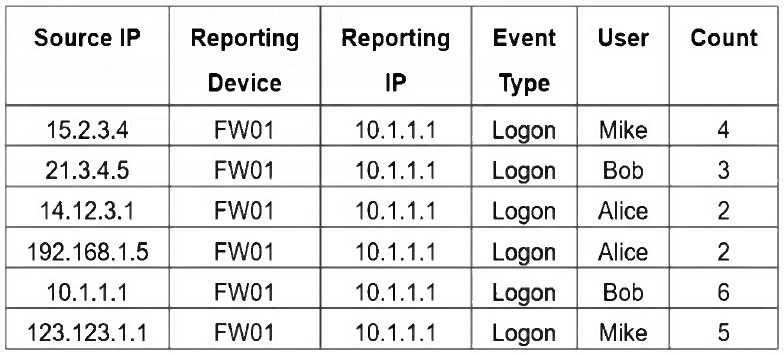
If you group the events by User, Source IP, and Count attributes, how many results will FortiSIEM display?
Correct : B
Grouping by User, Source IP, and Count means that each unique combination of those three attributes will be treated as a separate result. In the table, all six rows have distinct combinations of User, Source IP, and Count - so FortiSIEM will display 6 results.
Six because grouping by User, Source IP, and Count creates a separate result for every unique combination of those three selected attributes. The FortiSIEM Study Guide explains this grouping behavior in the single-subpattern rule example: ''If multiple VPN login failure events have the same source IP address, reporting device, reporting IP address, and user, they are grouped together in one row, and the count column tracks the number of events for each of those rows.'' Applying that rule here, FortiSIEM compares all selected Group By fields together. In the exhibit, every row has a unique Source IP address, even where the same user appears more than once. For example, Mike appears twice, but the Source IP and Count values are different. Alice appears twice with Count 2, but the Source IP values are different. Bob appears twice, but both Source IP and Count are different. Since no row has the same User, Source IP, and Count combination as another row, FortiSIEM displays all six rows.
Start a Discussions
Submit Your Answer:
Question 2
You need to model for predicting a target based on other fields in the dataset and then trigger an anomaly if the value does not match the prediction.
Which machine learning algorithm will build this type of model?
Correct : C
The correct answer is C. Regression. Regression is the machine learning task used when a model predicts a target value based on other fields in a dataset. In FortiSIEM's machine learning workflow, regression configuration includes selecting Fields to use for Prediction and a Field to Predict. The User Guide explains that during regression training, the analyst chooses the fields used for prediction and the field being predicted, then trains the model with a Train factor. This matches the question exactly: the model predicts a target based on other fields, and the inference phase can identify anomalies when observed values differ significantly from predicted values. Classification is used to assign records to discrete classes or categories, not to predict a continuous target metric from other variables. Clustering groups similar observations without a predefined target field. Forecasting predicts future values over time, normally based on time-series behavior. Because the question specifically describes predicting a target field from other dataset fields and detecting mismatch from the prediction, the correct machine learning method is Regression.
Start a Discussions
Submit Your Answer:
Question 3
When configuring machine learning (ML), in which step can you modify how the model fits the training data set?
Correct : B
The correct answer is B. Train. In FortiSIEM machine learning, the Train step is where the model is built from the prepared dataset and where model-fitting behavior can be adjusted. The FortiSIEM 7.4 User Guide explains that after preparing data, the analyst goes to Analytics > Machine Learning > Train, selects the machine learning task, chooses the algorithm, selects the prediction/target fields when required, and chooses the Train factor, which determines how much data is used for training versus testing. The guide states that the Train factor should be greater than 70%, meaning 70% of the data is used for training and 30% for testing. It also explains that model quality metrics show how accurately the algorithm predicts the field. For regression, lower MAE means a better fit, and R2 shows how well predictions approximate real data points. Most importantly, the guide states: ''If you want to change the algorithm parameters and re-train, then click Tune & Train, change the parameters and click Save & Train.'' This confirms that modifying how the model fits the training dataset is done in the Train step, not Prepare Data, Statistics, or Design.
Start a Discussions
Submit Your Answer:
Question 4
Which run mode takes the most time to perform machine learning tasks?
Correct : A
The correct answer is Local Auto. The uploaded answer was right, but its explanation was sloppy because it incorrectly described Local mode as the most time-consuming mode. In FortiSIEM machine learning, Local Auto mode selects the best algorithm by evaluating multiple candidate algorithms. The User Guide states that in Local Auto mode, ''FortiSIEM picks the best algorithm'' and that the Max Run Time parameter limits how long the job can run; longer runtime can produce better results. That is why Local Auto can take the most time. Forecasting and Regression are task types, not run modes.
Start a Discussions
Submit Your Answer:
Question 5
An analyst wants to create a rule from a newly created analytics search.
What is the quickest method?
Correct : A
The correct answer is A. The FortiSIEM Study Guide explicitly lists Create Rule as one of the actions that can be performed directly from Analytics search results. The guide states that to perform actions on results, an analyst clicks Actions and can choose options such as Email Result, Export Result, Add Result to Case, Copy To New Tab, Save Report, and Create Rule. The rules lesson further explains what happens after clicking Create Rule: FortiSIEM opens a new rule configuration window and creates a subpattern based on the analytics search parameters. It states that FortiSIEM uses the analytics search filter conditions to create the rule subpattern filter conditions, uses the search display conditions to create the rule Group By conditions, and sets the Aggregate condition to COUNT(Matched Events) >= 1. Creating a new rule manually under Resources > Rules would work, but it is slower because the analyst must manually re-enter the search criteria. The direct Analytics > Actions > Create Rule workflow is the quickest method.
Start a Discussions
Submit Your Answer:
Want to Unlock Everything for
Fortinet NSE6_FSM_AN-7.4 Exam?
Fortinet NSE6_FSM_AN-7.4 Exam?
By upgrading to Premium Access, you’ll instantly unlock:
Unlock 48 Premium Questions
- Exam Name: Fortinet NSE 6 - FortiSIEM 7.4 Analyst
- Exam Code: NSE6_FSM_AN-7.4
- Last Update: 13-Jul-2026
- Formats: PDF, Web-based,
Desktop Practice - 24/7 Customer Support
 Price: $59 (PDF Format)