 Unlock
Page: 1
/
30
Total 146 questions
Question 1
Refer to the exhibit, which contains the output of diagnose vpn tunnel list.
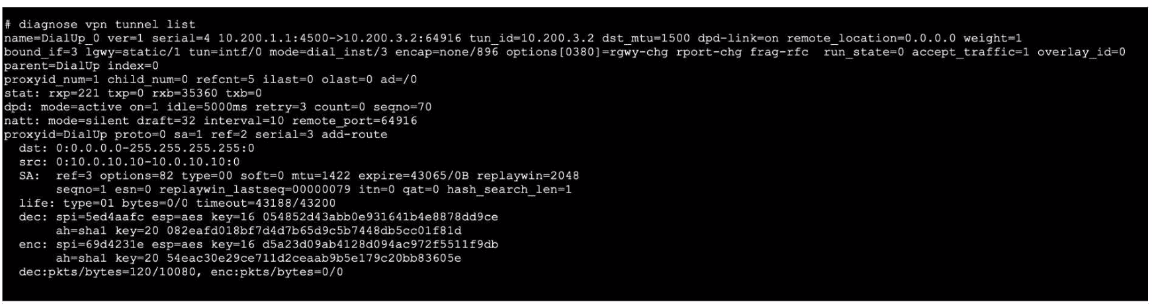
Which command will capture ESP traffic for the VPN named DialUp_0?
Correct : D
Start a Discussions
Submit Your Answer:
Question 2
Exhibit.
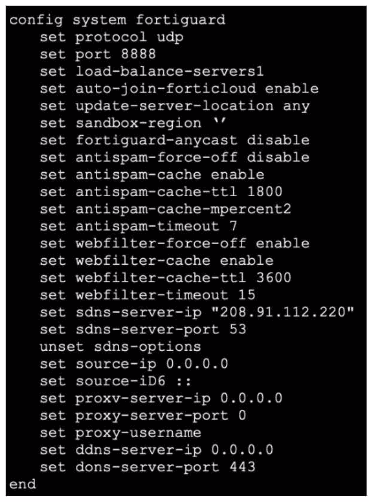
Refer to the exhibit, which shows a FortiGate configuration.
An administrator is troubleshooting a web filter issue on FortiGate. The administrator has configured a web filter profile and applied it to a policy; however the web filter is not inspecting any traffic that is passing through the policy.
What must the administrator do to fix the issue?
Correct : A
The exhibit showsa FortiGate configurationunderconfig system fortiguardrelated to web filtering and FortiGuard options. There is a line:
set webfilter-force-off enable
According to official Fortinet documentation, the 'webfilter-force-off' option, when enabled, causes the FortiGate tobypassweb filteringfor all traffic---even if a webfilter profileis applied toa policy. Thisoverride is typicallyused for troubleshootingor performancereasons and isdocumented asan explicit bypassfeature.
Ifan administratorwants to enforceweb filteringinspection, thissettingmustbe disabled. The correctway to restoreweb filteringfunctionalityis to run:
set webfilter-force-off disable
Once done, traffic passing throughpolicies withweb filter profileswill be inspectedand filteredas per configuration. Other settingssuch as timeoutor cache TTLdo not bypassweb filtering; they only affectoperational nuances.
FortiOS AdministrationGuide: Web Filtering, FortiGuard Options, ''webfilter-force-off'' CLI
Start a Discussions
Submit Your Answer:
Question 3
Refer to the exhibit.
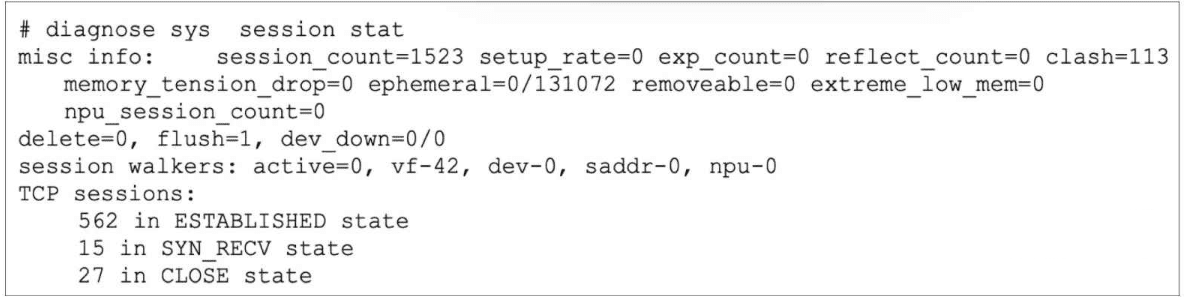
The partial output of diagnose sys session stat command is shown.
Which statement about the output shown in the exhibit is correct?
Correct : C
The correct answer is C.
The exhibit shows:
562 in ESTABLISHED state
27 in CLOSE state
memory_tension_drop=0
ephemeral=0/131072
According to the study guide, for TCP sessions: ''The protocol state in the session table is a two-digit number. For TCP, the first number (from left to right) is related to the server-side state and is 0 when the session is not subject to any inspection (flow or proxy)... The second digit is the client-side state.'' The same page also shows that value 1 = ESTABLISHED
So, if a TCP session is in ESTABLISHED state and there is no inspection, its proto_state is 01:
first digit 0 = no inspection
second digit 1 = ESTABLISHED
That makes C correct. This is also consistent with FortiOS examples showing established TCP sessions with proto=6 proto_state=01
Why the other options are wrong:
A is wrong because the field that indicates sessions dropped due to low free memory is memory_tension_drop, and in the exhibit it is 0, not 113. The study guide states: ''If there is a lack of free memory, the kernel deletes the oldest sessions. The command shown on this slide displays the number of sessions the kernel deleted because of this mechanism.''So 113 is the clash value, not memory-tension drops.
B is wrong because ephemeral=0/131072 does not mean 131072 ephemeral sessions were recorded. The study guide explains that FortiGate ''sets a hard limit on the maximum number of ephemeral sessions that can exist at the same time in the session table.''Therefore:
0 = current ephemeral sessions
131072 = maximum allowed ephemeral sessions for that model/context
D is wrong because the study guide says the temporary retention for possible out-of-order packets happens in state value 5 (TIME_WAIT): ''When a session is closed by both the sender and receiver, FortiGate keeps that session in the session table for a few seconds, to allow for any out-of-order packets that might arrive after the FIN/ACK packet. This is the state value 5.''But the exhibit shows 27 in CLOSE state, and the same table shows CLOSE = 6, not TIME_WAIT
So the verified answer is C.
Start a Discussions
Submit Your Answer:
Question 4
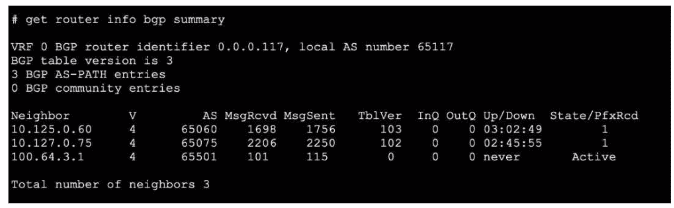
Refer to the exhibit, which shows the output of a BGP debug command.
What can you conclude about the router in this scenario?
Correct : D
The BGP debug output shows session information for peers, including state details. According to official Fortinet BGP documentation, if the session state with a peer does not show 'Idle,' 'Active,' or 'Connect,' but instead shows 'Established,' 'Up,' or related counters (e.g., messages sent/received or uptime), it indicates the session is operational. In this scenario, the peer 10.127.0.75 is the only one showing a positive indication of a live, established session. Other options like neighbor-range configuration, AS mismatch, or route-maps blocking prefixes are not supported by evidence provided in a simple BGP session state debug, nor does the output show errors relating to local or remote AS issues.
The correct interpretation comes from Fortinet's BGP troubleshooting guide, which outlines how to read session status and neighbor states in debug and summary outputs.
FortiOS BGP Debugging Guide: Session State Interpretation
BGP CLI Reference: Neighbor Status Fields
Start a Discussions
Submit Your Answer:
Question 5
Consider the scenario where the server name indication (SNI) does not match either the common name (CN) or any of the subject alternative names (SAN) in the server certificate. Which two actions will FortiGate take when using the default settings for SSL certificate inspection? (Choose two answers)
Correct : C, D
The correct answers are C and D.
The study guide states: ''SSL certificate inspection relies on extracting the FQDN of the URL from either: TLS extension server name indication (SNI), SSL certificate common name (CN).'' It also says: ''When using SSL certificate inspection, FortiGate is not decrypting the traffic. It is only inspecting the server digital certificates and the SNI field, which are interchanged before the encryption.''
This proves the second part of the answer:
under SSL certificate inspection, FortiGate does not decrypt the traffic
therefore, if the traffic is allowed, it still passes without decryption
That makes D correct.
For the SNI mismatch behavior, the FortiOS administration guide describes the default Server certificate SNI check behavior as:
''Enable: If it is mismatched use the CN in the server certificate for URL''
So if the SNI does not match the CN or any SAN, FortiGate falls back to using the CN from the Subject field for URL handling under the default setting. That makes C correct.
Why the other options are wrong:
A is wrong because with the default SNI-check behavior, when the SNI mismatches the certificate identity, FortiGate does not continue using the mismatched SNI. Instead, it uses the CN in the server certificate for the URL.
B is not the best answer in this single pair selection. While certificate inspection does not decrypt traffic, the key default behavior the documents explicitly highlight for this mismatch case is:
use the CN when SNI mismatches, and
certificate inspection does not decrypt allowed HTTPS traffic.
So the verified answers are: C, D.
Start a Discussions
Submit Your Answer:
Want to Unlock Everything for
Fortinet NSE7_FSN_AR-7.6 Exam?
Fortinet NSE7_FSN_AR-7.6 Exam?
By upgrading to Premium Access, you’ll instantly unlock:
Unlock 146 Premium Questions
- Exam Name: Fortinet NSE 7 - Secure Networking 7.6 Architect
- Exam Code: NSE7_FSN_AR-7.6
- Last Update: 05-Aug-2026
- Formats: PDF, Web-based,
Desktop Practice - 24/7 Customer Support
 Price: $59 (PDF Format)