 Unlock
Page: 1
/
18
Total 88 questions
Status : RETIRED
Master Fortinet NSE7_SSE_AD-25: NSE 7 - FortiSASE 25 Enterprise Administrator Exam Success
Question 1
Which secure internet access (SIA) use case minimizes individual workstation or device setup, because you do not need to install FortiClient on endpoints or configure explicit web proxy settings on web browser-based end points?
Correct : B
The Secure Internet Access (SIA) use case that minimizes individual workstation or device setup is SIA for agentless remote users. This use case does not require installing FortiClient on endpoints or configuring explicit web proxy settings on web browser-based endpoints, making it the simplest and most efficient deployment.
SIA for Agentless Remote Users:
Agentless deployment allows remote users to connect to the SIA service without needing to install any client software or configure browser settings.
This approach reduces the setup and maintenance overhead for both users and administrators.
Minimized Setup:
Without the need for FortiClient installation or explicit proxy configuration, the deployment is straightforward and quick.
Users can securely access the internet with minimal disruption and administrative effort.
FortiOS 7.6 Administration Guide: Details on different SIA deployment use cases and configurations.
FortiSASE 23.2 Documentation: Explains how SIA for agentless remote users is implemented and the benefits it provides.
Start a Discussions
Submit Your Answer:
Question 2
Refer to the exhibit.
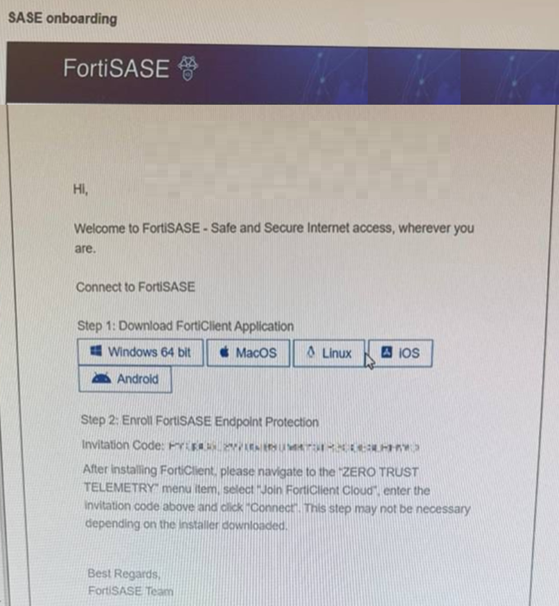
Which two statements about the onboarding process shown in the exhibit are true? (Choose two answers)
Correct : B, D
The exhibit (image_6361c9.jpg) displays a standard SASE onboarding email sent from the FortiSASE platform to an end user to facilitate the enrollment of their device.
Communication Source (D): This email is generated by the FortiSASE administrator through the Onboard Users menu in the FortiSASE portal. It provides the user with direct download links for the FortiClient application and a unique Invitation Code required for telemetry connection.
Installer Types and Automation (B): FortiSASE provides two primary methods for deploying the client agent:
Pre-configured Installer: This version is pre-packaged with the organization's unique invitation code built-in. When a user runs this installer, the invitation code step is skipped as the client automatically registers to the correct FortiSASE instance upon installation.
Manual Installer: This version requires the user to manually copy and paste the invitation code from the onboarding email into the FortiClient 'Zero Trust Telemetry' menu to complete enrollment.
Analysis of Incorrect Options:
Option A: FortiSASE utilizes a unified agent (FortiClient). The components (VPN, ZTNA, Web Filter, etc.) are managed via Endpoint Profiles assigned in the SASE portal and pushed to the client automatically; they are not manually selected by the user during installation.
Option C: As noted above, if the administrator provides a pre-configured installer, the manual entry of the code is not required, making the statement that it must 'always' be entered manually false.
Start a Discussions
Submit Your Answer:
Question 3
Which two statements about the Hub Selection Method in FortiSASE Secure Private Access (SPA) are correct? (Choose two answers)
Correct : A, B
According to the NSE7 SASE Enterprise Guide (Pages 64 & 153), FortiSASE utilizes an intelligent engine to manage connectivity to private resources through various selection methods:
Hub Health and Priority: FortiSASE incorporates a built-in SD-WAN engine for intelligent routing selection among established IPsec links. The health check IP address periodically receives performance metrics, including jitter, latency, and packet loss, for each service connection. In this mode, FortiSASE evaluates the available hubs and selects the one with the highest priority (the most preferred value) within each POP, provided that the hub meets the defined service-level agreement (SLA) requirements. For this configuration to function correctly, both FortiSASE and the SPA hub must use the same Autonomous System Number (ASN).
BGP Multiple Exit Discriminator (MED): This method leverages the standard BGP MED attribute, which allows an autonomous system to signal its preferred entry point to a peer. FortiSASE learns the MED values advertised by the configured hubs. The architecture is designed so that the lower the MED value, the more preferred the path is to the receiving router. Consistent with the 'Zero Trust' and 'Secure Access' principles, even when using BGP MED, the selection is gated by the health engine; therefore, the hub is only selected if it also satisfies the configured SLA thresholds.
While SLA thresholds can be configured, the primary logic for hub selection focuses on how priority and dynamic routing attributes (like MED) interact with the real-time health of the tunnel.
Start a Discussions
Submit Your Answer:
Question 4
Refer to the exhibit.
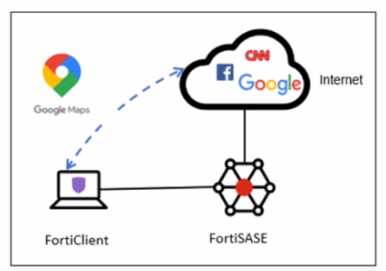
A company has a requirement to inspect all the endpoint internet traffic on FortiSASE, and exclude Google Maps traffic from the FortiSASE VPN tunnel and redirect it to the endpoint physical Interface.
Which configuration must you apply to achieve this requirement?
Correct : C
To meet the requirement of inspecting all endpoint internet traffic on FortiSASE while excluding Google Maps traffic from the FortiSASE VPN tunnel and redirecting it to the endpoint's physical interface, you should configure split tunneling. Split tunneling allows specific traffic to bypass the VPN tunnel and be routed directly through the endpoint's local interface.
Split Tunneling Configuration:
Split tunneling enables selective traffic to be routed outside the VPN tunnel.
By configuring the Google Maps Fully Qualified Domain Name (FQDN) as a split tunneling destination, you ensure that traffic to Google Maps bypasses the VPN tunnel and uses the endpoint's local interface instead.
Implementation Steps:
Access the FortiSASE endpoint profile configuration.
Add the Google Maps FQDN to the split tunneling destinations list.
This configuration directs traffic intended for Google Maps to bypass the VPN tunnel and be routed directly through the endpoint's physical network interface.
FortiOS 7.6 Administration Guide: Provides details on split tunneling configuration.
FortiSASE 23.2 Documentation: Explains how to set up and manage split tunneling for specific destinations.
Start a Discussions
Submit Your Answer:
Question 5
How does FortiSASE hide user information when viewing and analyzing logs?
Correct : B
FortiSASE hides user information when viewing and analyzing logs by hashing data using salt. This approach ensures that sensitive user information is obfuscated, enhancing privacy and security.
Hashing Data with Salt:
Hashing data involves converting it into a fixed-size string of characters, which is typically a hash value.
Salting adds random data to the input of the hash function, ensuring that even identical inputs produce different hash values.
This method provides enhanced security by making it more difficult to reverse-engineer the original data from the hash value.
Security and Privacy:
Using salted hashes ensures that user information remains secure and private when stored or analyzed in logs.
This technique is widely used in security systems to protect sensitive data from unauthorized access.
FortiOS 7.6 Administration Guide: Provides information on log management and data protection techniques.
FortiSASE 23.2 Documentation: Details on how FortiSASE implements data hashing and salting to secure user information in logs.
Start a Discussions
Submit Your Answer:
Want to Unlock Everything for
Fortinet NSE7_SSE_AD-25 Exam?
Fortinet NSE7_SSE_AD-25 Exam?
By upgrading to Premium Access, you’ll instantly unlock:
Unlock 88 Premium Questions
- Exam Name: Fortinet NSE 7 - FortiSASE 25 Enterprise Administrator
- Exam Code: NSE7_SSE_AD-25
- Last Update: 14-Aug-2026
- Formats: PDF, Web-based,
Desktop Practice - 24/7 Customer Support
 Price: $59 (PDF Format)