 Unlock
Page: 1
/
29
Total 143 questions
Oracle Fusion Cloud Financials: General Ledger 2026 Implementation Professional 1Z0-1054-26 Exam Practice Questions – Updated 2026
Breaking into Oracle's elite circle of certified General Ledger professionals demands more than memorization—it requires strategic preparation that mirrors real-world financial system implementations. Our comprehensive 1Z0-1054-26 practice materials transform anxious candidates into confident exam-takers through authentic scenario-based questions that reflect actual Oracle Fusion Cloud Financials challenges. Whether you're an aspiring Financial Systems Analyst, ERP Implementation Consultant, or GL Configuration Specialist, these resources adapt to your learning style across PDF, web-based, and desktop formats. Thousands of professionals have already accelerated their careers, commanding premium salaries in cloud financial management roles. Don't let exam anxiety derail your Oracle Fusion Cloud Financials: General Ledger 2026 Implementation Professional certification journey. With regularly updated content mirroring Oracle's latest exam patterns, you'll master chart of accounts structures, period close processes, and advanced allocation rules while building the practical expertise employers desperately seek. Your transformation from candidate to certified Oracle specialist starts here.
Question 1
Financial Reporting Web Studio is a powerful tool within the Oracle Fusion Cloud suite, designed to empower financial professionals with advanced reporting capabilities.
Which two are key capabilities of Financial Reporting Web Studio?
Correct : A, B
Start a Discussions
Submit Your Answer:
Question 2
SIMULATION
Manage Chart of Accounts Structure and Instance
Scenario
Your client is implementing Oracle Fusion Cloud Financials. The decision is to have a 5-segment Chart of Accounts: Company, Cost Center, Account, Product, and Intercompany. You are working in
the General Ledger team and will be responsible for creating the Chart of Accounts Structure and Instance for the Chart of Accounts.
Task 1
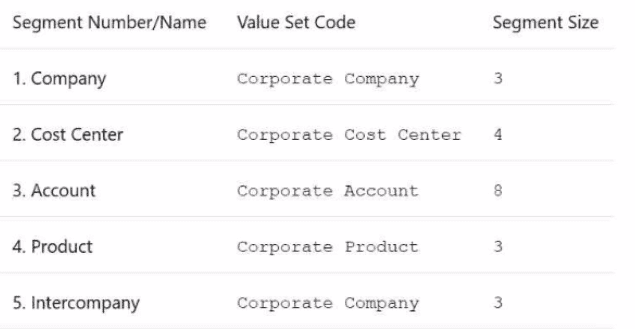
Create a Chart of Accounts Structure and Instance for the following Chart of Accounts:
Note:
* Prefix all your setups with 07, where 07 is your candidate ID
* There is one balancing segment.
* Choose the appropriate segment labels.
. For the purpose of this test there is no need to deploy the flexfield.
. Valid code combinations should be added to the Code Combination table automatically.
* Shorthand aliases will not be implemented.
. Accept the defaults for the instance segments.
Correct : A
Here are the steps you need to follow:
Navigate to the Setup and Maintenance work area and search for the task Manage Chart of Accounts Structures.
Click on the Create icon to create a new Chart of Accounts Structure. Enter the following information:
Structure Code: 07COA
Structure Name: 07 Chart of Accounts
Description: Chart of Accounts for candidate 07
Number of Segments: 5
Click on the Next button to define the segments. Enter the following information for each segment:
Segment Number: 1
Segment Name: Company
Value Set Code: 07Corporate Company
Value Set Name: 07 Corporate Company
Maximum Size: 3
Balancing: Yes
Segment Label: Company
Segment Number: 2
Segment Name: Cost Center
Value Set Code: 07Corporate Cost Center
Value Set Name: 07 Corporate Cost Center
Maximum Size: 4
Balancing: No
Segment Label: Cost Center
Segment Number: 3
Segment Name: Account
Value Set Code: 07Corporate Account
Value Set Name: 07 Corporate Account
Maximum Size: 8
Balancing: No
Segment Label: Natural Account
Segment Number: 4
Segment Name: Product
Value Set Code: 07Corporate Product
Value Set Name: 07 Corporate Product
Maximum Size: 3
Balancing: No
Segment Label: Product
Segment Number: 5
Segment Name: Intercompany
Value Set Code: 07Corporate Company
Value Set Name: 07 Corporate Company
Maximum Size: 3
Balancing: No
Segment Label: Intercompany
Click on the Next button to review the summary and click on the Save and Close button to save the Chart of Accounts Structure.
Navigate to the Setup and Maintenance work area and search for the task Manage Chart of Accounts Structure Instances.
Click on the Create icon to create a new Chart of Accounts Structure Instance. Enter the following information:
Structure Code: 07COA
Structure Name: 07 Chart of Accounts
Description: Chart of Accounts for candidate 07
Chart of Accounts Structure: 07COA
Enabled: Yes
Allow Dynamic Inserts: Yes
Click on the Next button to review the summary and click on the Save and Close button to save the Chart of Accounts Structure Instance.
You have successfully created a Chart of Accounts Structure and Instance for the given scenario. For more information, you can refer to the following resources:
Chart of Accounts Structures and Instances
Chart of Accounts Components
Minimum Steps For Financial Enterprise Structures Configuration
Overview of Creating and Configuring Chart of Accounts Structure and Instances
Start a Discussions
Submit Your Answer:
Question 3
You attempt to activate a tree version, but the audit process fails. In which two ways can you resolve this?
Correct : C, D
Start a Discussions
Submit Your Answer:
Question 4
Which two statements are true regarding the Translation process? (Choose two.)
Correct : A, B
According to Oracle documentation1, the following statements are true regarding the Translation process: Any resulting offset from the translation is entered in the Cumulative Translation Adjustment account, and if necessary, before submitting the Translation process, the Revaluation process should be completed. The Translation process enables you to translate balances from one currency to another for reporting purposes. The Translation process calculates any difference between the translated balance and the entered balance and posts it to the Cumulative Translation Adjustment account. The Revaluation process enables you to adjust balances denominated in foreign currencies to reflect current exchange rates. The Revaluation process should be completed before the Translation process to ensure that the balances are accurate. Therefore, options A and B are correct. Option C is incorrect because the Translation process should be run after posting Period Close adjustment entries. Option D is incorrect because the Translation process can be used for translating the balances of primary ledgers, secondary ledgers, and reporting currencies. Option E is incorrect because the Translation process can be used to translate both balance sheet accounts and income statement accounts.
Start a Discussions
Submit Your Answer:
Question 5
In a primary ledger, under the System options, in the Close section, the "Prevent General Ledger Period Closure When Open Subledger Periods Exist" option has been selected.
For which subledger can you opt out of the Period Close Checking feature by using the ORA_GL_INCLD_STRICT_PRD_CLOSE lookup?
Correct : A
Start a Discussions
Submit Your Answer:
Want to Unlock Everything for
Oracle 1Z0-1054-26 Exam?
Oracle 1Z0-1054-26 Exam?
By upgrading to Premium Access, you’ll instantly unlock:
Unlock 143 Premium Questions
-
Exam Name: Oracle Fusion Cloud Financials: General Ledger 2026 Implementation Professional
-
Exam Code: 1Z0-1054-26
-
Last Update: 30-Aug-2026
-
Formats: PDF, Web-based,
Desktop Practice -
24/7 Customer Support
 Price: $59 (PDF Format)