 Unlock
Page: 1
/
15
Total 75 questions
Master Oracle Solaris 11 Installation and Configuration Essentials 1Z0-580: Your Gateway to Success
Question 1
Which two actions are used to permanently configure a new interface?
Correct : B, D
Start a Discussions
Submit Your Answer:
Question 2
Which two actions must be taken to enable IP forwarding on all interfaces yet disable on a specific interface?
Correct : A, E
The routeadm command is used to administer system-wide configuration for IP forwarding and routing. IP forwarding is the passing of IP packets from one network to another; IP routing is the use of a routing protocol to determine routes.
-e option...
Enable the specified option. The effect is to prepare the associated services (svc:/network/ipv4-forwarding:default in the case of ipv4-forwarding) for enabling. By means of the routing-svcs variable, the routing daemons are specified to be enabled on subsequent boot or when routeadm -u is run.
-d option...
Disable the specified option. The effect is to prepare the associated services (svc:/network/ipv4-forwarding:default in the case of ipv4-forwarding) for enabling. By means of the routing-svcs variable, the routing daemons are specified to be disabled on subsequent boot or when routeadm -u is run.
Start a Discussions
Submit Your Answer:
Question 3
The "pkg update" command will ______.
Correct : A
Updating all of the packages on your installed system -- To update all of the packages on your system that have available updates, use the pkg update command, as follows:
# pkg update
Running this command updates packages that you might not otherwise consider updating, for example, kernel components and other low-level system packages.
Start a Discussions
Submit Your Answer:
Question 4
To upgrade a system from Oracle Solaris 10 to Oracle Solaris 11, it is necessary to________.
Correct : D
There are no upgrade methods or tools available to transition from Oracle Solaris 10 to Oracle Solaris 11. You cannot use an installer to upgrade from Oracle Solaris 10 to Oracle Solaris 11.
Oracle Solaris 11 Transition Tools and Features
Note:
* There are no upgrade methods or tools available to transition from Oracle Solaris 10 to Oracle Solaris 11. You cannot use an installer to upgrade from Oracle Solaris 10 to Oracle Solaris 11.
/ JumpStart Migration Utility (js2ai)
Used to convert Oracle Solaris 10 JumpStart rules and profiles to a format that is compatible with AI manifest entries.
/ ZFS shadow migration feature
Used to migrate data from an existing file system to a new file system.
/ Oracle Solaris 11 support for Oracle Solaris 10 zones
Used to migrate your Oracle Solaris 10 application environments to an Oracle Solaris 11 system.
/ NFS file sharing and pool migration
Used to access shared files from an Oracle Solaris 10 system on an Oracle Solaris 11 system.
Used to import a ZFS storage pool from an Oracle Solaris 10 system into an Oracle Solaris 11 system.
Start a Discussions
Submit Your Answer:
Question 5
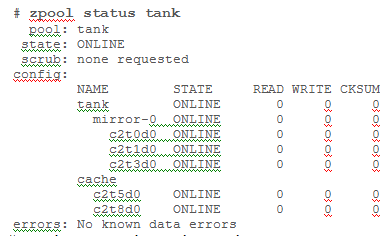
Your system has two disk devices, c2t0d0 and c2t1d0, and two flash devices, c2t5d0 and c2t8d0. Which command would you to create a storage pool named ''tank,'' which mirrors the disks and adds the two flash devices as ''cache''?
Correct : D
Creating a ZFS Storage Pool with Cache Devices
You can create a storage pool with cache devices to cache storage pool data. For example:
# zpool create tank mirror c2t0d0 c2t1d0 c2t3d0 cache c2t5d0 c2t8d0
Note:
* Creating a Basic Storage Pool
The following command creates a new pool named tank that consists of the disks c1t0d0 and c1t1d0:
# zpool create tank c1t0d0 c1t1d0
These whole disks are found in the /dev/dsk directory and are labelled appropriately by ZFS to contain a single, large slice. Data is dynamically striped across both disks.
* Creating a Mirrored Storage Pool
To create a mirrored pool, use the mirror keyword, followed by any number of storage devices that will comprise the mirror. Multiple mirrors can be specified by repeating the mirror keyword on the command line. The following command creates a pool with two, two-way mirrors:
# zpool create tank mirror c1d0 c2d0 mirror c3d0 c4d0
Start a Discussions
Submit Your Answer:
Want to Unlock Everything for
Oracle 1Z0-580 Exam?
Oracle 1Z0-580 Exam?
By upgrading to Premium Access, you’ll instantly unlock:
Unlock 75 Premium Questions
- Exam Name: Solaris 11 Installation and Configuration Essentials
- Exam Code: 1Z0-580
- Last Update: 26-Aug-2026
- Formats: PDF, Web-based,
Desktop Practice - 24/7 Customer Support
 Price: $59 (PDF Format)