 Unlock
Page: 1
/
49
Total 243 questions
Master Oracle Solaris 11 System Administration - Ace Your 1Z0-821 Exam!
Question 1
You attempted to reboot a system via the init command, however the system did not perform boot sequence into the Oracle Solaris Operating Environment. You are presented with a prompt from the OpenBoot PROM. Which command would you enter, to boot the system from the default device?
Correct : B
Boot
With this form, boot loads and executes the program specified by the default boot arguments from the default boot device
Note: boot has the following general format:
boot [device-specifier] [arguments]
where device-specifier and arguments are optional.
Start a Discussions
Submit Your Answer:
Question 2
You have installed the SMF notification framework to monitor services. Which command is used to set up the notifications for a particular service?
Correct : A
How to Set Up Email Notification of SMF Transition Events
This procedure causes the system to generate an email notification each time one of the services or a selected service has a change in state. You can choose to use either SMTP or SNMP. Normally, you would only select SNMP if you already have SNMP configured for some other reason.
By default, SNMP traps are sent on maintenance transitions. If you use SNMP for monitoring, you can configure additional traps for other state transitions.
1. Become an administrator or assume a role that includes the Service Management rights profile.'
2. Set notification parameters.
Example 1:
The following command creates a notification that sends email when transactions go into the maintenance state.
# /usr/sbin/svccfg setnotify -g maintenance mailto:sysadmins@example.com
Example 2:
The following command creates a notification that sends email when the switch service goes into the online state.
Note: The svccfg command manipulates data in the service configuration repository. svccfg can be invoked interactively, with an individual subcommand, or by specifying a command file that contains a series of subcommands.
Changes made to an existing service in the repository typically do not take effect for that service until the next time the service instance is refreshed.
Start a Discussions
Submit Your Answer:
Question 3
A local repository is available on this system and you need to enable clients to access this repository via HTTP. The repository information is:
PUBLISHERTYPESTATUSURI
solarisoriginonlinehttp://sysA .example.com
Identify two of the steps that are required to make the local repository on this server available to the client via HTTP.
Correct : A, E
A: Configure the Repository Server Service
To enable clients to access the local repository via HTTP, enable the application/pkg/server
Service Management Facility (SMF) service.
# svccfg -s application/pkg/server setprop pkg/inst_root=/export/repoSolaris11
# svccfg -s application/pkg/server setprop pkg/readonly=true
E: Use pkg.depotd to serve the repository to clients.
Start the Repository Service
Restart the pkg.depotd repository service.
# svcadm refresh application/pkg/server
# svcadm enable application/pkg/server
To check whether the repository server is working, open a browser window on the localhost location.
Start a Discussions
Submit Your Answer:
Question 4
Review the ZFS dataset output that is displayed on your system:
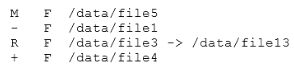
Which four correctly describe the output?
Correct : A, C, E, G
A: + Indicates the file/directory was added in the later dataset
C: R Indicates the file/directory was renamed in the later dataset
E: - Indicates the file/directory was removed in the later dataset
G: M Indicates the file/directory was modified in the later dataset
Note: Identifying ZFS Snapshot Differences (zfs diff)
You can determine ZFS snapshot differences by using the zfs diff command.
The following table summarizes the file or directory changes that are identified by the zfs diff command.
File or Directory Change Identifier
* File or directory is modified or file or directory link changed
M
* File or directory is present in the older snapshot but not in the newer snapshot
---
* File or directory is present in the newer snapshot but not in the older snapshot
+
* File or directory is renamed
R
Start a Discussions
Submit Your Answer:
Question 5
You display the IP interface information with ipmpstat -i.
Which two characteristics are indicated by characters that may be included in the FLAGS column?
Correct : D, E
FLAGS
Indicates the status of each underlying interface, which can be one or any combination of the following:
(D) d indicates that the interface is down and therefore unusable.
(E) M indicates that the interface is designated by the system to send and receive IPv6 multicast traffic for the IPMP group.
Note:
i indicates that the INACTIVE flag is set for the interface. Therefore, the interface is not used to send or receive data traffic.
s indicates that the interface is configured to be a standby interface.
m indicates that the interface is designated by the system to send and receive IPv4 multicast traffic for the IPMP group.
b indicates that the interface is designated by the system to receive broadcast traffic for the IPMP group.
h indicates that the interface shares a duplicate physical hardware address with another interface and has been taken offline. The h flag indicates that the interface is unusable.
Start a Discussions
Submit Your Answer:
Want to Unlock Everything for
Oracle 1Z0-821 Exam?
Oracle 1Z0-821 Exam?
By upgrading to Premium Access, you’ll instantly unlock:
Unlock 243 Premium Questions
- Exam Name: Solaris 11 System Administration
- Exam Code: 1Z0-821
- Last Update: 20-Aug-2026
- Formats: PDF, Web-based,
Desktop Practice - 24/7 Customer Support
 Price: $59 (PDF Format)