 Unlock
Page: 1
/
35
Total 174 questions
Unlock Salesforce Mastery: Salesforce Certified Tableau Data Analyst Analytics-DA-201 Success Awaits!
Question 1
You have a Tableau workbook that contain three worksheets named Sheet1 Sheet2 and Sheet3.
You create several filters.
From the Data Source page you plan to add data source fillers
When type of filter will appear in the Edit Data Source Filters dialog box?
Correct : D
A data source filter is a filter that applies to all the worksheets that use the same data source. It filters the data before any other filters or calculations are applied. You can add a data source filter from the Data Source page by clicking on the Add button next to Filters.
The type of filter that will appear in the Edit Data Source Filters dialog box is a dimension filter on all the sheets. This means that you can choose a dimension from your data source and filter it by values, range, condition, or top/bottom. The filter will affect all the worksheets that use that dimension.
The other types of filters are not data source filters and will not appear in the Edit Data Source Filters dialog box. A table calculation filter is a filter that applies to a table calculation, such as percent of total or running total. A top N condition filter is a filter that shows only the top or bottom N values of a measure or dimension based on a condition. A context filter is a filter that creates a subset of data that other filters can use.
Data source filters in Tableau apply to the entire data source, affecting all sheets that use that data source. The Edit Data Source Filters dialog box allows you to add filters that operate at the data source level, which is different from context filters, top N filters, or table calculation filters that are applied at the worksheet level.
Start a Discussions
Submit Your Answer:
Question 2
You have the following dashboard.
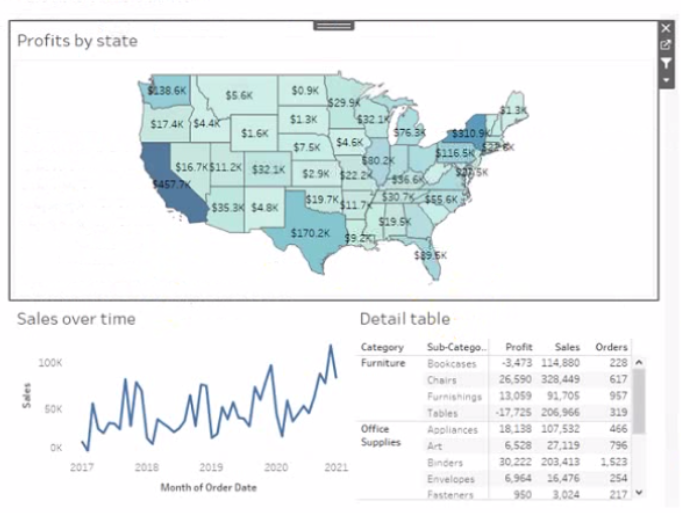
Currently the map is used as a filter that affects the data on the otter sheets of the dashboard
You need to configure the dashboard to ensure that selecting a data point on the map only tillers the Detail table
What should you do?
Correct : A
To configure the dashboard to ensure that selecting a data point on the map only filters the Detail table, you should select Ignore Actions from the context menu of Sales over time. Ignore Actions is a feature that allows you to exclude a sheet from being affected by any actions on the dashboard, such as filters or highlights. You can select Ignore Actions by right-clicking on a sheet on the dashboard and selecting Ignore Actions from the menu.
In this case, you want to exclude Sales over time from being filtered by the map, so you should select Ignore Actions from its context menu. This will make Sales over time ignore any selections on the map and show all values. The Detail table will still be filtered by the map as usual.
The other options are not correct for this scenario. Removing Dashboard Item will delete Sales over time from the dashboard, which is not what you want. Deselecting Use as Filter will disable the map as a filter for any sheet on the dashboard, which is not what you want. Selecting Deselect will clear any selections on the map, but it will not prevent Sales over time from being filtered by future selections. Reference: https://help.tableau.com/current/pro/desktop/en-us/actions.htm https://help.tableau.com/current/pro/desktop/en-us/actions_ignore.htm
On a Tableau dashboard, when a map is used as a filter, it affects all other sheets in the dashboard by default. To restrict the filter action to only affect the Detail table and not the 'Sales over time' chart, you would modify the action settings. By selecting 'Ignore Actions' from the context menu of the 'Sales over time' chart, it will no longer respond to the filtering action initiated by selecting data points on the map.
Start a Discussions
Submit Your Answer:
Question 3
In a dataset, a Data Analyst has a string field named Name that contains unnecessary semicolons.
Which function should the analyst use to remove the semicolons from the Name field?
Correct : D
Start a Discussions
Submit Your Answer:
Question 4
From Tableau Desktop you sign in lo a Tableau Server site.
What appears in the list of available data sources when you search for a published data source?
Correct : C
When signed in to Tableau Server from Tableau Desktop, you'll only be able to see the data sources that have been published to the site and are within the folders that you have been granted access to. Tableau's permission and project structure mean that you won't see all data sources from the entire server unless you have permissions to do so.
Start a Discussions
Submit Your Answer:
Question 5
You have a workbook that uses an extracted data source.
You publish the workbook to Tableau Server.
Which three actions can you perform from the Extract Refresh page in Tableau Server? Choose three.
Correct : A, C, D
Start a Discussions
Submit Your Answer:
Want to Unlock Everything for
Salesforce Analytics-DA-201 Exam?
Salesforce Analytics-DA-201 Exam?
By upgrading to Premium Access, you’ll instantly unlock:
Unlock 174 Premium Questions
- Exam Name: Salesforce Certified Tableau Data Analyst
- Exam Code: Analytics-DA-201
- Last Update: 07-Aug-2026
- Formats: PDF, Web-based,
Desktop Practice - 24/7 Customer Support
 Price: $59 (PDF Format)