 Unlock
Page: 1
/
37
Total 181 questions
Unlock Salesforce Mastery: Salesforce Certified OmniStudio Developer Plat-Dev-210 Success Awaits
Question 1
A developer examines data received from an external data source. The data is nested two levels down in the JSON structure.
Which OmniStudio tool could the developer use to simplify this data?
Correct : B
A DataRaptor Transform can simplify nested data by transforming it into a flat structure. The developer can use JSON paths to map the input data to the output data and define the output structure.
Start a Discussions
Submit Your Answer:
Question 2
Refer to the following row-versioned calculation matrix.
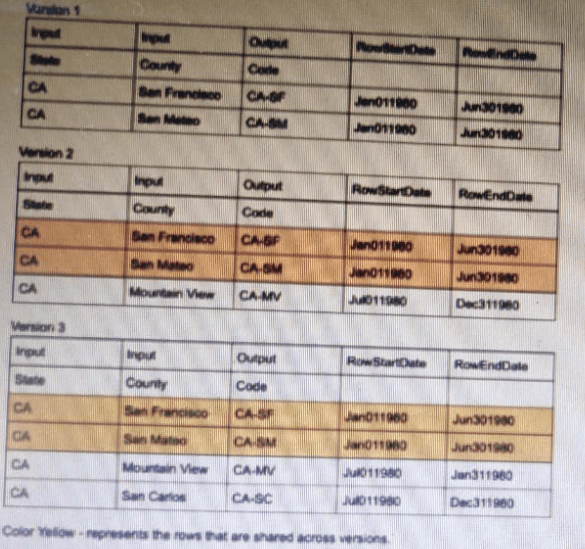
The developer needs to delete the row that contains the Code CA-SF.
If the developer deletes that row in Version 3, whatis the result?
Correct : A
Deleting a row in Version 3 will only affect that version, not any previous or future versions. The row that contains the Code CA-SF will remain in Versions 1 and 2, as well as any versions created after Version 3. The other options are incorrect because they imply that deleting a row in one version will affect other versions as well.
Start a Discussions
Submit Your Answer:
Question 3
A developer is configuring the API URL in an HTTP Action element within an Integration Procedure.
What is the merge code syntax for passing a Date node from an element named SetValues in the URL?
Correct : C
In OmniStudio Integration Procedures, when referencing data from a prior step in the HTTP Action URL, the correct merge code syntax is:
%ElementName.PropertyName%
So, referencing a value called Date from a step named SetValues must be written as:
%SetValues.Date%
This is the format recognized by the OmniStudio Merge Language (OML) for dynamic value substitution in URLs or headers.
Incorrect Options:
A . Invalid syntax -- not recognized by OmniStudio merge logic.
B . {{SetValues.Date}} is used in FlexCards, not in Integration Procedures.
D . %SetValues: Date% is incorrect merge syntax due to space and colon use.
:
Salesforce OmniStudio Documentation Merge Code Syntax for Integration Procedures
Start a Discussions
Submit Your Answer:
Question 4
A developer configures a Flexcard with a DataRaptor data source that uses the params.id as an. When the developer clicks Views Data on the FlexCard, valid data displays. However, when the developer previews the layout, the FlexCard does not display. What could cause this error?
Choose 2 answers
Correct : A, D
The Data Node field for the FlexCard is required to specify which data source will be used to populate the FlexCard. If it is empty, the FlexCard will not display any data. The Record Id in the Test Data Source settings is used to preview the layout with a specific record. If there is no Salesforce record for that Record Id, the FlexCard will not display any data either.
Start a Discussions
Submit Your Answer:
Question 5
A developer is configuring an Integration Procedure Action in an OmniScript. The OmniScript needs a JSON response from the Integration Procedure but does not need to wait for the response for the user to proceed.
Which feature should the developer enable?
Correct : C
In OmniStudio, the Invoke Mode: Fire and Forget setting allows an OmniScript to call an Integration Procedure asynchronously, meaning it does not wait for the response to complete before continuing user interaction.
C . Invoke Mode Fire and Forget -- This is the correct setting. It's designed specifically for use cases where the user experience should not be blocked by backend processing.
Incorrect Options:
A . Use Future is not a valid OmniScript configuration option.
B . Invoke Mode Non-Blocking is not an official setting in OmniStudio terminology.
D . Toast Completion is a UI notification setting and does not impact execution behavior.
:
OmniStudio Developer Guide Integration Procedure Actions in OmniScripts
Start a Discussions
Submit Your Answer:
Want to Unlock Everything for
Salesforce Plat-Dev-210 Exam?
Salesforce Plat-Dev-210 Exam?
By upgrading to Premium Access, you’ll instantly unlock:
Unlock 181 Premium Questions
- Exam Name: Salesforce Certified OmniStudio Developer
- Exam Code: Plat-Dev-210
- Last Update: 10-Aug-2026
- Formats: PDF, Web-based,
Desktop Practice - 24/7 Customer Support
 Price: $59 (PDF Format)