 Unlock
Page: 1
/
43
Total 213 questions
Unlock Your Salesforce Career: Master Salesforce Certified CPQ Administrator Sales-Admn-202
Question 1
The Edit Lines Field Set Name special field on the Quote object references a Field Set that directly controls which characteristic of the Quote Line Editor?
Correct : C
Requirement Overview:
Control the visibility of fields in the Quote Line Editor.
Solution:
The Edit Lines Field Set Name special field on the Quote object references the field set used to control which Quote Line fields are visible in the editor.
Steps to Configure:
Navigate to the Field Set on the Quote Line object.
Add or remove fields from the field set referenced in the Edit Lines Field Set Name field.
Validation:
Test the Quote Line Editor to ensure only the configured fields are visible.
Start a Discussions
Submit Your Answer:
Question 2
What is the correct order of data import to load Quote Template in CPQ?
Correct : A
Data Import Order for Quote Templates:
Salesforce CPQ requires Quote Template data to be imported in a structured order to ensure that relationships between objects are correctly established.
Quote Template: Base structure for the quote document.
Template Sections: Define sections of the quote.
Line Columns: Specify how data appears in tables within the quote.
Template Content: Includes HTML and text for the quote layout.
Quote Terms: Define legal or contractual terms.
Term Conditions: Conditions related to the terms.
Salesforce CPQ Reference:
Best practices for Quote Template imports align with Salesforce CPQ implementation guides for maintaining dependencies .
Start a Discussions
Submit Your Answer:
Question 3
Which two scenarios can be supported using Amendments? Choose 2 answers
Correct : A, C
Amendment Functionality:
Amendments are used to modify existing contracts by adjusting quantities, discounts, or adding products while maintaining contract continuity.
Supported Scenarios:
A: Quantity changes with new discounts can be applied during amendments.
C: New products can be added and aligned with the contract's existing term (co-terminated).
Salesforce CPQ Reference:
Amendments are extensively documented under Contract and Subscription Management .
Start a Discussions
Submit Your Answer:
Question 4
When creating Orders from Quotes with Salesforce CPQ, the Admin wants to separate similar Products into Orders based on the Product Family of the Products being ordered.
Which two steps must the Admin perform to automatically split these types of Orders? Choose 2 answers
Correct : B, C
Comprehensive Detailed Step-by-Step Explanation with all Salesforce CPQ Reference
To split orders based on product family when creating orders from quotes in Salesforce CPQ, the following steps must be followed:
Enable the Allow Multiple Orders Setting
Navigate to Setup > Installed Packages and locate Salesforce CPQ.
Click Configure, then go to the Orders tab in the CPQ package settings.
Check the Allow Multiple Orders option. This allows multiple orders to be created from a single quote.
This setting ensures that products can be grouped and split into separate orders based on specific criteria like Product Family.
Set the Order By Field to Product Family
From the object management settings for Quotes, edit the Order By field.
Add 'Product Family' as a picklist value if it is not already available.
On the Quote, select Product Family in the Order By field.
Save your changes. When creating an order, Salesforce CPQ will group quote lines into separate orders based on the Product Family.
Process for Creating Orders
On the quote, select the Ordered checkbox.
Salesforce CPQ will automatically split the quote into multiple orders, grouping quote lines by the Product Family value.
Notes and Considerations
If some quote lines do not have a value for the field used in the Order By, they will be grouped into one order.
This functionality is available in Salesforce CPQ editions starting from Summer '16.
By following these steps, administrators can ensure that similar products are automatically separated into different orders based on their product family.
Start a Discussions
Submit Your Answer:
Question 5
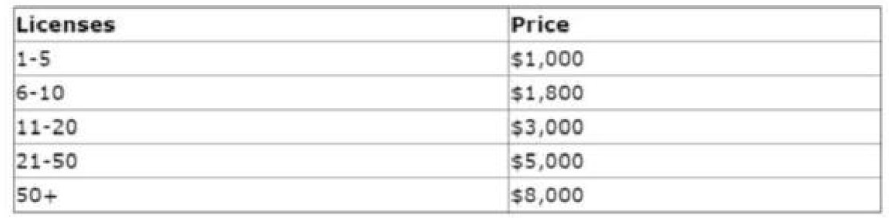
Universal Containers (UC) licenses shipping software that is sold for a fixed price based on each quantity tier as seen in the table below. For example, buying eight licenses would cost a total of $1,800 rather than multiplying unit price by quantity. Further discounts on this product are unavailable.
Which three steps should the Admin take to set up this pricing? Choose 3 answers
Correct : B, D, E
Requirement:
Use fixed pricing for quantity tiers without additional discounts.
Solution Steps:
B: Marking the product as Non-Discountable prevents additional discounts.
D: Set the Pricing Method to Block to define fixed prices per quantity tier.
E: Create Block Pricing records to define fixed prices for each quantity tier (e.g., 1-5 licenses = $1,000).
Why Other Options Are Incorrect:
A: Fixed Price is not suitable for tiered pricing.
C: Slab Discount Schedules are not used for block pricing.
Salesforce CPQ Reference:
Tiered and Block Pricing setups are detailed in Pricing Configuration .
Start a Discussions
Submit Your Answer:
Want to Unlock Everything for
Salesforce Sales-Admn-202 Exam?
Salesforce Sales-Admn-202 Exam?
By upgrading to Premium Access, you’ll instantly unlock:
Unlock 213 Premium Questions
- Exam Name: Salesforce Certified CPQ Administrator
- Exam Code: Sales-Admn-202
- Last Update: 08-Aug-2026
- Formats: PDF, Web-based,
Desktop Practice - 24/7 Customer Support
 Price: $59 (PDF Format)